Guide
SaaS pricing page examples, and what each one shows
By coExploro · Published · Updated
Reviewed and edited by coExploro · Independent, not affiliated · Public methodology · Corrections: support@coexploro.com
These are twelve SaaS pricing pages from coExploro’s public samples, captured on 29 October 2026, with one observation each: Shopify, Asana, Crayon, Figma, Zapier, n8n, Slack, Supabase, Calendly, Notion, Loom and Webflow. They are grouped by the question a buyer brings to a pricing page, from what it costs to start to what is left to ask before buying.
What does it cost to start?
The first question a buyer brings is the price of the first step, and pricing pages answer it in very different ways. Shopify’s page closed with three starting offers in a row: three free days, a paid extension of the trial and credits. Asana’s showed a price on three of its four plans and sent the fourth to sales. Crayon’s showed no plan and no price, only a form that asks for an estimate. Read each first price with its conditions: when it ends, what it becomes, and whether a buyer can reach any price without talking to someone. Each card links to the full teardown it came from, such as the Shopify sample, and the two checks after the cards show what the live pages said later the same day.
Shopify pricing page
Designer · Captured
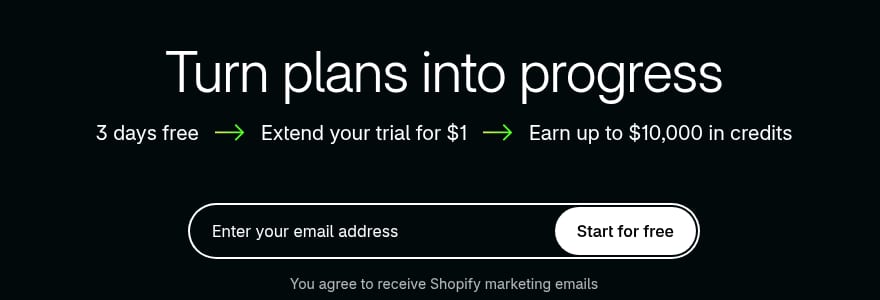
The closing band chains three offers with arrows
The pricing page ends with 'Turn plans into progress'. Under it, '3 days free', 'Extend your trial for $1' and 'Earn up to $10,000 in credits' sit in a row joined by arrows, above an email field.
Evidence:
Extend your trial for $1
· Seen on shopify.com/pricing, pricing page closing band, above the email field · Captured · Direct evidence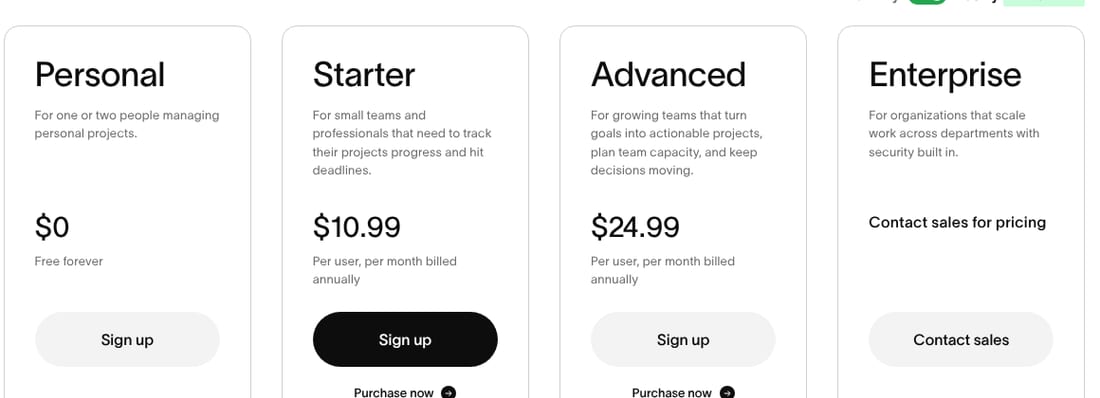
Asana pricing page
UX · Captured
Three of the four plans show a price on the page
The capture shows the billing switch on Yearly, labelled 'Save up to 18%'. Personal shows $0 and 'Free forever', and Starter and Advanced show $10.99 and $24.99 'Per user, per month billed annually'. Enterprise shows 'Contact sales for pricing'.
Evidence:
per month billed annually
· Seen on asana.com/pricing, plan cards, under the Starter and Advanced prices · Captured · Indirect evidence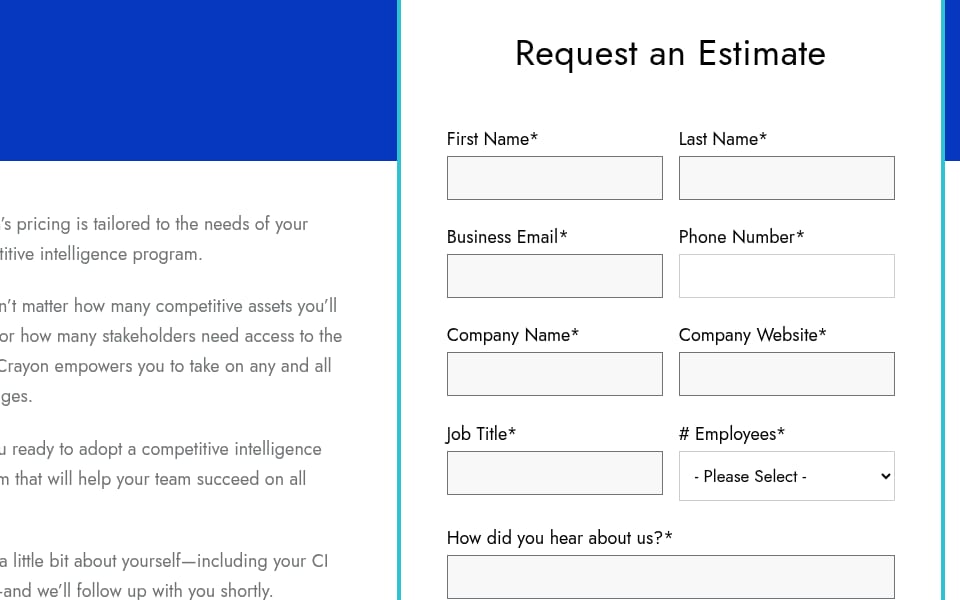
Crayon pricing page
UX · Captured
The pricing page is a ten-field estimate form
The pricing page shows a 'Request an Estimate' form and no plan or price. All ten field labels end in an asterisk, from 'First Name*' to 'Message*', and '# Employees*' is a drop-down reading '- Please Select -'. The button below reads 'Send Inquiry'.
Evidence:
Request an Estimate
· Seen on www.crayon.co/pricing, pricing page, heading of the form · Captured · Indirect evidence
Observed by us
Shopify’s pricing page opened with the headline ‘You've got plans. Us too.’ and a three-month introductory price, and the plan cards below it showed a monthly rate for each plan.
Observed by us
Asana’s pricing page showed a billing toggle labelled ‘Save up to 18%’, Personal as ‘Free forever’ and Starter ‘Per user, per month billed annually’.
Where these examples come from
Each card is one finding from a coExploro sample. Paste a product’s address and, in 2–4 minutes, coExploro captures that page with its date, then the site’s pricing and features pages when it finds them, and four AI analysts, PM, Marketing, UX and Designer, write findings from that capture. A screenshot gallery shows how a pricing page looks; each card here also says what one analyst noticed on it and when, and marks the words its receipt quotes when the finding has one. You can try one run a day per network without an account, a free account includes 3 teardowns a month, and paid plans start at $16 a month billed yearly. How to do a pricing page teardown reads one pricing page in all four roles.
Which plan is mine?
Once the cost of starting is clear, a buyer asks which plan fits, and some pages ask a question back before they show a price. Figma’s pricing hero asked a visitor to pick a plan and choose seats. Zapier’s opened plan selection with a question about task volume and a slider, before any plan price. n8n’s card shows a large price step between two neighbouring plans, Pro and Business, and the check below reads the same two plans in euros, as the page showed them to a network in Europe. A page that asks for volume or seats first sorts the buyer before the buyer compares; a page that shows every plan at once leaves the sorting to the buyer. Write down which of the two a page does, and what it tells a buyer who sits between two plans.
Figma pricing page
Marketing · Captured
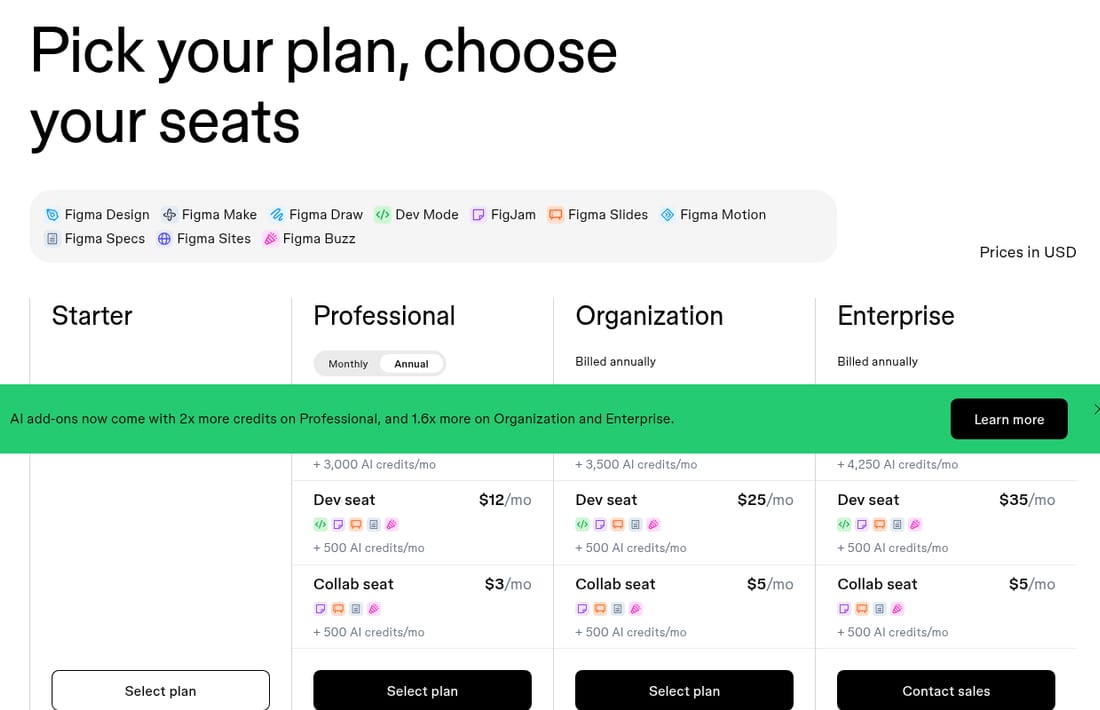
The hero opens with plan and seat selection
The headline reads 'Pick your plan, choose your seats'. The plan grid follows the product list below it, and each paid plan lists a 'Dev seat' and a 'Collab seat' with a monthly price.
Evidence:
Pick your plan, choose your seats
· Seen on www.figma.com/pricing/, pricing page hero headline · Captured · Direct evidence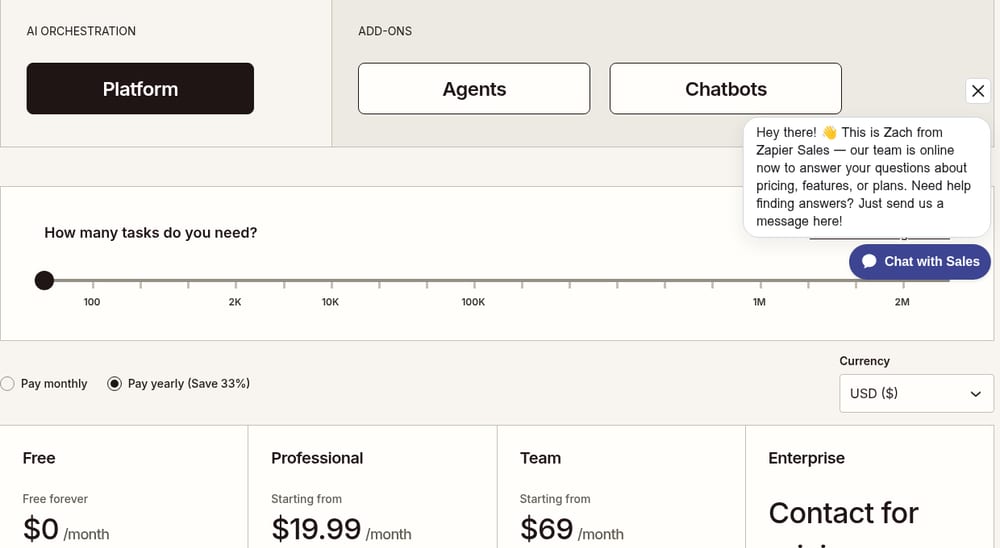
Zapier pricing page
Marketing · Captured
Plan selection starts with a task-volume slider
With the 'Platform' tab selected, the pricing page first asks 'How many tasks do you need?' above a slider marked from '100' to '2M'. The 'Pay monthly' and 'Pay yearly (Save 33%)' choice and the four plan cards with their prices come after it.
Evidence:
How many tasks do you need?
· Seen on zapier.com/pricing, pricing page, above the billing choice and the plan cards · Captured · Direct evidence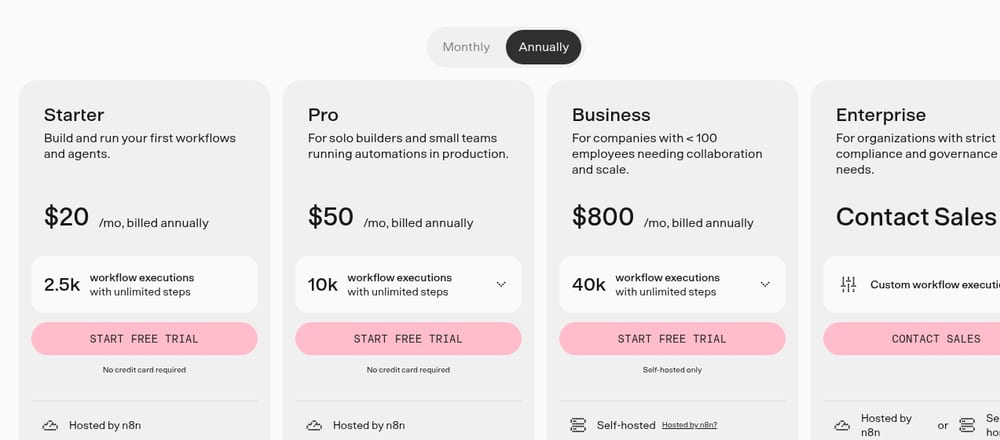
n8n pricing page
PM · Captured
Pro to Business is a sixteen-fold price step
With 'Annually' selected, Pro reads '$50 /mo, billed annually' for 10k workflow executions and Business '$800 /mo, billed annually' for 40k. Further down, a Startup plan card reads 'Under 20 employees? Check if you qualify for our Startup plan and get 50% off Business.'
Evidence:
/mo, billed annually
· Seen on n8n.io/pricing/, pricing page plan grid, beside the Pro and Business prices · Captured · Indirect evidence
Observed by us
Zapier’s pricing page put the question ‘How many tasks do you need?’ above a slider, ahead of every plan price.
Observed by us
Seen from a European network, n8n’s pricing page listed Pro at 50€ and Business at 667€ a month, billed annually, with Business marked self-hosted only.
verified · Source: n8n.io/pricing (opens in a new tab)
How do the plans differ?
With a plan in mind, a buyer compares it with the one above it. Slack’s plan cards mixed two billing periods: Pro and Business+ priced per user a month when paying monthly, under a three-month half-price offer, and Enterprise+ when paying annually. Supabase’s comparison table filled many cells with a check mark or a minus sign rather than words. Calendly’s cards set a price per seat a month beside a yearly contract floor, so the two numbers a buyer compares are in different units. A table of marks serves a buyer who knows the feature they need and can lose one who does not, while a card that mixes units or billing periods leaves the conversion to the buyer. Note the unit and the billing period of every price, and count the rows a buyer reads before two neighbouring plans differ.
Slack pricing page
UX · Captured
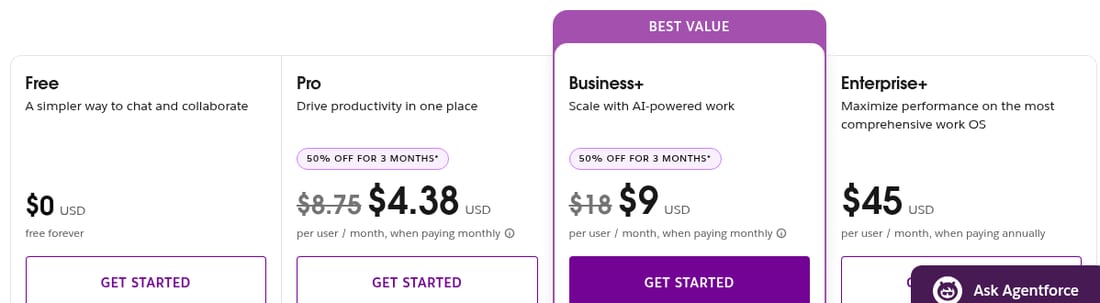
Each of the four plan cards shows a price in USD
Free reads '$0 USD' and 'free forever'. Pro and Business+ show '$8.75' and '$18' struck through beside '$4.38' and '$9', under '50% OFF FOR 3 MONTHS*', per user a month when paying monthly. Enterprise+ reads '$45 USD', per user a month when paying annually.
Evidence:
when paying annually
· Seen on slack.com/pricing, pricing page, Enterprise+ plan card, under the $45 price · Captured · Indirect evidence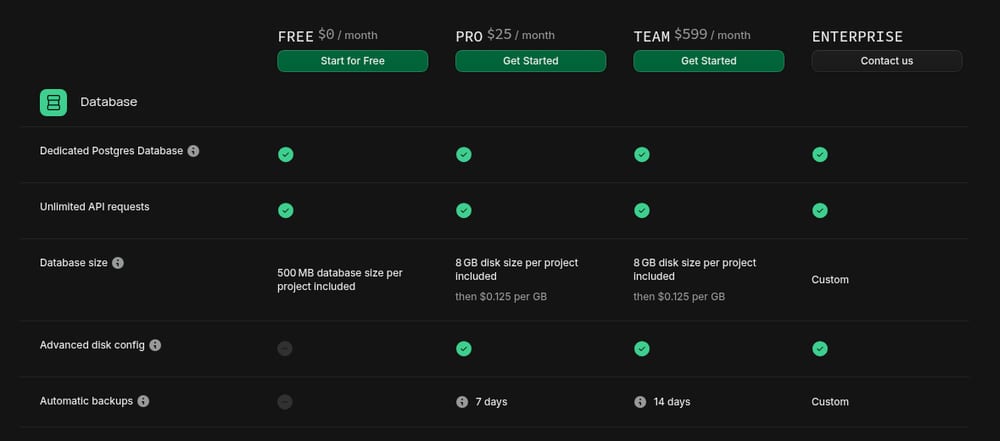
Supabase pricing page
UX · Captured
Comparison cells use green check marks and grey minus signs
In the plan comparison table further down the pricing page, many cells hold a green circle with a check mark or a grey circle with a minus sign rather than words. Other cells carry values such as '7 days', 'Never' or 'Custom'.
Evidence:
Advanced disk config
· Seen on supabase.com/pricing, pricing page comparison table, Database group, row label beside a grey minus sign for Free and green check marks for the paid plans · Captured · Indirect evidence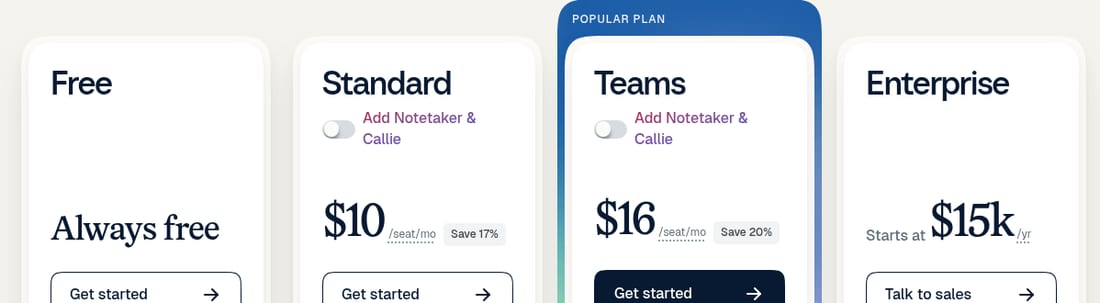
Calendly pricing page
Designer · Captured
Two price units sit side by side
With 'Billed yearly' selected above the cards, Standard reads '$10 /seat/mo' and Teams '$16 /seat/mo'. Enterprise, in the next card, reads 'Starts at $15k /yr'.
Evidence:
/seat/mo
· Seen on calendly.com/pricing, pricing page plan cards, after the Standard and Teams prices · Captured · Indirect evidence
Observed by us
Supabase’s pricing page listed Free at $0, Pro from $25 and Team from $599 a month.
verified · Source: supabase.com/pricing (opens in a new tab)
Observed by us
With yearly billing selected, Calendly’s pricing page set Teams at $16 per seat a month beside an Enterprise plan that ‘Starts at’ $15k a year.
verified · Source: calendly.com/pricing (opens in a new tab)
What is left to ask before buying?
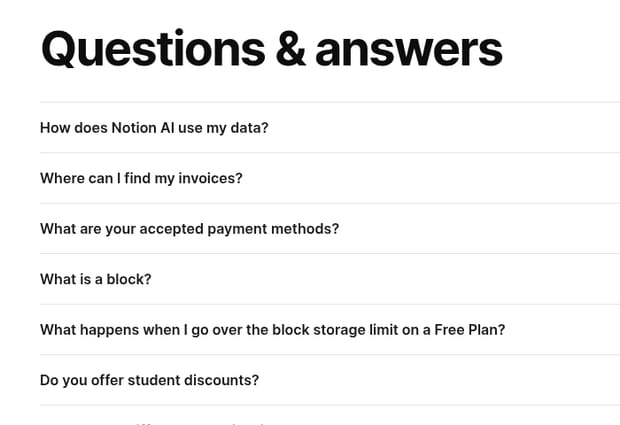
The FAQ under the plans is where a pricing page answers the doubts that remain, and its order shows which doubts the company puts first. Notion’s FAQ opened with how Notion AI uses a customer’s data, before invoices and payment methods. Loom’s second question explained buying Loom on Loom.com or on Atlassian.com. Webflow’s first four questions covered one billing distinction, between a Workspace plan and a Site plan. A reader can take the first three questions of a pricing FAQ as the company’s own list of a buyer’s doubts; check whether the plan cards answer any of them before a buyer scrolls that far. coExploro’s methodology states what a capture can and cannot show.
Notion pricing page
UX · Captured
Seventeen questions sit under the pricing table
The pricing FAQ, 'Questions & answers', sits below the 'Plans and features' table and lists seventeen questions. It opens with 'How does Notion AI use my data?' and only then asks 'Where can I find my invoices?' and 'What are your accepted payment methods?'
Evidence:
How does Notion AI use my data?
· Seen on www.notion.so/pricing, FAQ below the plan tables, first question · Captured · Indirect evidence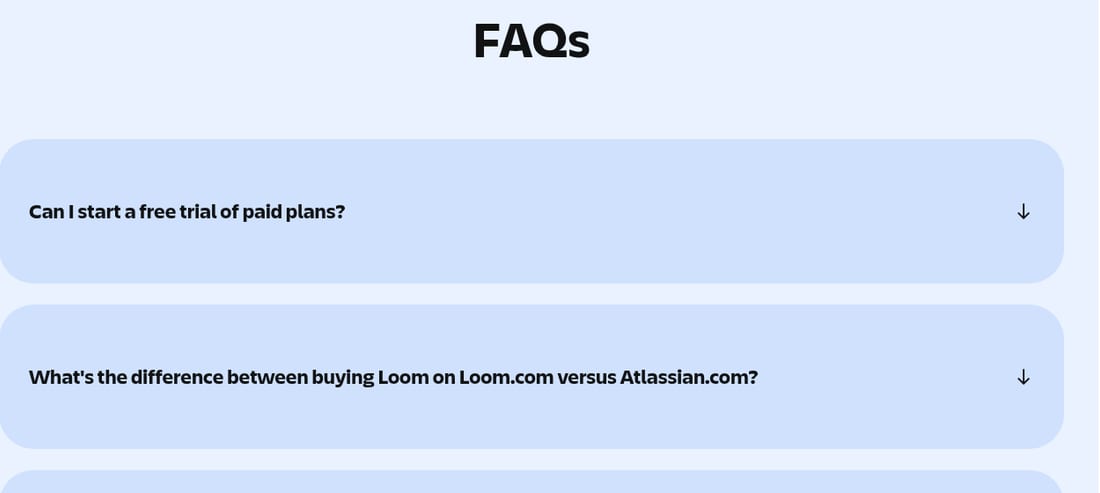
Loom pricing page
PM · Captured
The pricing FAQ covers buying through Atlassian.com
The pricing FAQ below the plan cards and the feature table lists ten questions. The second is 'What's the difference between buying Loom on Loom.com versus Atlassian.com?', and the header logo reads 'ATLASSIAN' above 'Loom'.
Evidence:
What's the difference between buying Loom on Loom.com versus Atlassian.com?
· Seen on loom.com/pricing, pricing FAQ below the plan cards, second question · Captured · Direct evidence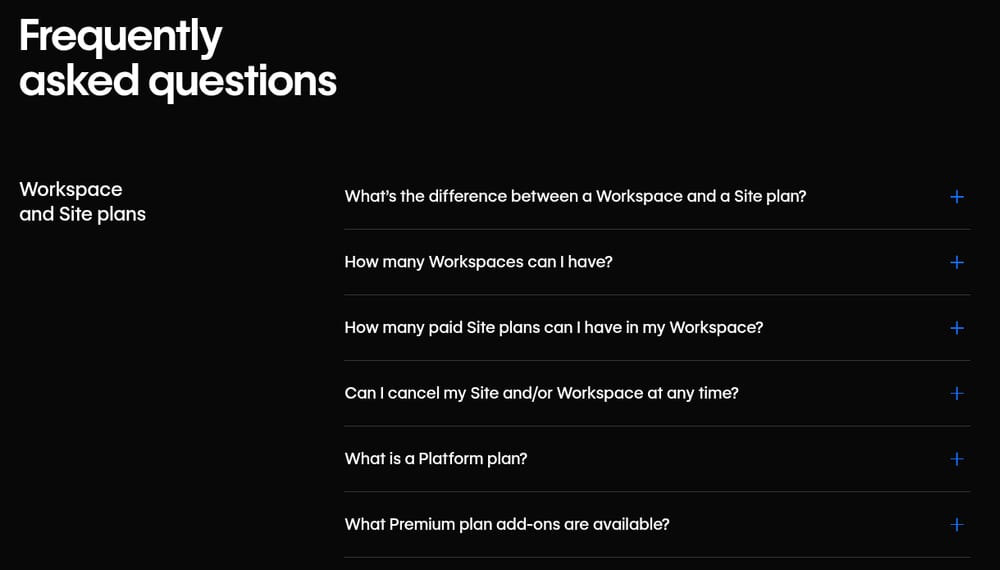
Webflow pricing page
UX · Captured
Four opening FAQ entries cover one distinction
The pricing FAQ's first group, 'Workspace and Site plans', opens with 'What’s the difference between a Workspace and a Site plan?' The next three ask how many Workspaces and paid Site plans are allowed and whether a Site or Workspace can be cancelled at any time. The group's fifth and sixth questions cover Platform plans and Premium plan add-ons.
Evidence:
What’s the difference between a Workspace and a Site plan?
· Seen on webflow.com/pricing, pricing FAQ, first question of the 'Workspace and Site plans' group · Captured · Indirect evidence
Limits
What these examples do not show
- Each card shows a page on its capture date, and a price or a label on it may have changed since. The checks after the groups read the live pages later on 29 October 2026 from Europe, so Shopify’s check names no amount and n8n’s gives euros, the currency those pages showed us.
- One observation per page is one analyst’s note, not a review of the whole page or of the product.
- The pages come from coExploro’s public samples, so the list reflects the products sampled, not a ranking of the best SaaS pricing pages.
- A frame shows one part of a page on its capture date; it does not show the rest of the page, another screen width or what happens after a click.
See it on a real product
The closing band chains three offers with arrows · Shopify
Evidence:
Extend your trial for $1
· Seen on shopify.com/pricing, pricing page closing band, above the email field · Captured · Direct evidenceThe pricing FAQ opens with three questions on AI requests · Asana
Evidence:
What is an AI request?
· Seen on asana.com/pricing, pricing FAQ, first question · Captured · Direct evidence
Shopify
Commerce platform
Overall score 70 · Captured
Shopify's pricing hero offers 3 days free, then $1/month for 3 months, Plus starts at $2,300 USD/mo, and the homepage offers 'Start with your agent'.
Asana
Work and project management
Overall score 69 · Captured
Asana presents AI Teammates as named team roles, prices three of its four plans, and opens its pricing FAQ with three questions on AI requests.
Crayon
Competitor intel and sales battlecards
Overall score 68 · Captured
Crayon's pricing page is a ten-field estimate form with no price shown, and its homepage opens customer cards with figures and lists two AI features.
Questions
What makes good SaaS pricing page design?
A capture cannot rank the best pricing pages, because how well a page sells depends on traffic and buyers it does not show. What a capture can show is how a page answers the four questions a buyer brings: what it costs to start, which plan fits, how the plans differ and what is left to ask. The examples on this page are grouped by those questions.
Where do the frames on this page come from?
Each frame is cut from the capture of the coExploro teardown its card links to, taken on 29 October 2026. When a finding has a receipt, a mark in the analyst’s colour sits on the words it quotes; a card without a receipt shows the part of the page its finding reads, without a mark.
How current are these prices?
Each card shows the page on its capture date, 29 October 2026. The dated checks after the groups show what the live pages said later that day, read from Europe, so Shopify’s check names no amount and n8n’s gives euros. Open the live page before you quote any price from here.
How were these pricing pages chosen?
They come from coExploro’s public samples, product teardowns of a company’s homepage, pricing and features pages. Each example is one finding about a pricing page, chosen so that every group shows a different answer to its question. coExploro is not affiliated with any of these companies.
Can I get this reading of a competitor’s pricing page?
Yes. Paste the address in the form on this page: coExploro captures the homepage, then the pricing and features pages when it finds them, and four AI analysts write findings from that capture. One run a day per network works without an account.
Run your own
Start with one product.
See how a competitor's homepage and pricing page are built to convert. Paste its address: coExploro captures its public pages, such as the homepage and pricing page, and four AI analysts read them for calls to action, pricing and trust signals. It takes 2–4 minutes.