Guide
How to do a pricing page teardown
By coExploro · Published · Updated
Reviewed and edited by coExploro · Independent, not affiliated · Public methodology · Corrections: support@coexploro.com
A pricing page teardown is a dated reading of a pricing page, yours or a rival’s, in four roles: what the plans commit a buyer to, how the price is framed, how a buyer compares the plans, and what the layout puts first. The readings below run on coExploro’s Miro, Figma and Intercom samples.
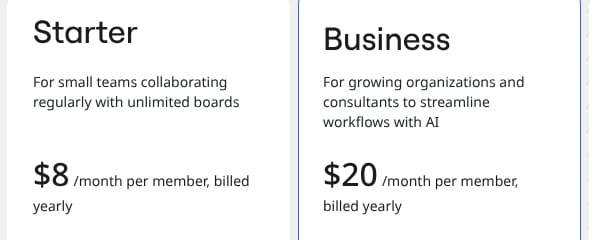
per member, billed yearly
Capture the pricing page with its date
A price can change without notice, so a pricing page teardown starts with a copy of the page and the day you saw it. Save the whole page, not only the plan cards: the comparison table and the FAQ below them answer the questions the cards leave open. Write down which billing period the toggle showed and which currency you saw, because some pricing pages show another currency or other prices to a visitor from another country. coExploro captured the Miro sample on 29 October 2026, as a visitor without an account sees the page. The frames on this page are cut from the samples’ captures, with a mark on the words a finding quotes when it has a receipt; in a teardown you run, a finding can open the screenshot it was read from when one is attached.
Run a pricing page teardown in coExploro
coExploro reads a pricing page in the same four roles. Give it a product’s homepage address: in 2–4 minutes it captures that page with its date, then the site’s pricing and features pages when it finds them, and four AI analysts, PM, Marketing, UX and Designer, write findings from that capture. So a pricing finding sits beside a reading of the homepage that leads a buyer to the price. You can try one run a day per network without an account, a free account includes 3 teardowns a month, and paid plans start at $16 a month billed yearly. It captures public pages, and it does not tell you which price will sell better.
A pricing page teardown by hand and in coExploro
By hand
- Pages read
- The pricing page you open and save
- Readers
- You, or whoever you ask
- Evidence
- Screenshots and notes you keep
- Time
- As much as the reading takes
- Left to you
- Every step
coExploro
- Pages read
- The homepage you paste, then the pricing and features pages it finds
- Readers
- Four AI analysts: PM, Marketing, UX and Designer
- Evidence
- A dated capture, with the screenshot behind a finding where one is attached
- Time
- 2–4 minutes
- Left to you
- The question, the like-for-like reading and the re-check before you quote a price
| By hand | coExploro | |
|---|---|---|
| Pages read | The pricing page you open and save | The homepage you paste, then the pricing and features pages it finds |
| Readers | You, or whoever you ask | Four AI analysts: PM, Marketing, UX and Designer |
| Evidence | Screenshots and notes you keep | A dated capture, with the screenshot behind a finding where one is attached |
| Time | As much as the reading takes | 2–4 minutes |
| Left to you | Every step | The question, the like-for-like reading and the re-check before you quote a price |
coExploro captures public pages and runs no price or conversion test.
The PM reading: what the plans commit a buyer to
A product manager reads a pricing page for what each plan commits a buyer to: the unit a plan is sold in, the billing period it binds a buyer to, which capabilities sit in which plan and what moves a buyer to the next one. The Miro sample’s PM analyst read the plan grid: Starter and Business are priced per member a month, billed yearly, and Enterprise is custom pricing from 30 members. Each of those words is a commitment: a count of members, a year, a minimum team size. For a rival, the question to carry away is what a buyer signs up for at each plan, and whether yours asks for the same.
Miro · PM · Captured
Starter and Business are priced per member, billed yearly
The plan grid lists Free at '$0', Starter at '$8 /month per member, billed yearly' and Business at '$20 /month per member, billed yearly'. Enterprise reads 'Custom pricing—from 30 members'.
Evidence:
per member, billed yearly
· Seen on miro.com/pricing/, pricing page plan grid, under the Starter and Business prices · Captured · Indirect evidence
The Marketing reading: how the price is framed
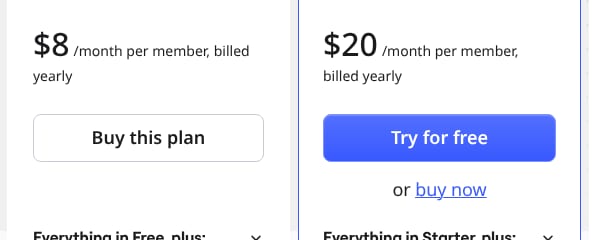
A marketer reads how the price is presented before the number itself: the billing period shown first, a saving written on the toggle, a free plan, a trial, the words on each button. Those choices decide what a buyer does first. The Miro sample’s Marketing analyst found the two paid plans asking for different first steps: Starter’s button reads ‘Buy this plan’, while Business’s reads ‘Try for free’, with ‘or buy now’ beneath it. A buyer moving from Starter to Business meets a purchase on one card and a trial on the next. Note what each plan asks a buyer to do first, buy or try, and write every price with its unit and billing period, never as a bare figure.
Miro · Marketing · Captured
Starter's button reads 'Buy this plan', Business's 'Try for free'
On the plan cards, Starter's button reads 'Buy this plan'. Business's button reads 'Try for free', with 'or buy now' under it, where only 'buy now' is underlined. Free's button reads 'Start for free' and Enterprise's 'Contact sales'.
Evidence:
Buy this plan
· Seen on miro.com/pricing/, pricing page, button on the Starter plan card · Captured · Direct evidence
The UX reading: how a buyer compares the plans
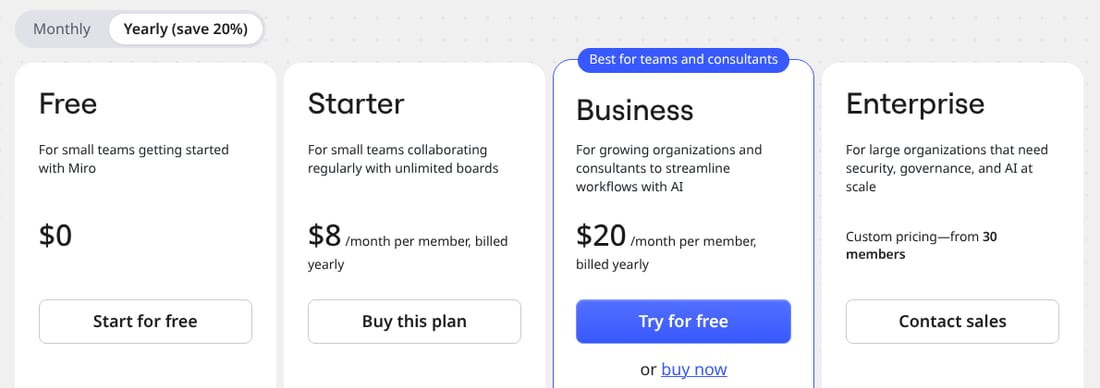
Pricing page UX is the path from the plan cards to an answer, and a UX lead reads it: how many plans a buyer weighs, where the full comparison sits, and how many rows stand between a question and its answer. A comparison table serves the buyer who knows which feature they need, and it can lose the one who does not. The Miro sample’s UX analyst found four plan cards side by side in one row under the Monthly and Yearly switch, each with a price line, one button and a list of features. Count the plans a buyer weighs at once, note what a card lists and what it leaves to the comparison table further down, and check whether the FAQ answers the questions the cards raise.
Miro · UX · Captured
Four plan cards sit side by side in one row
Free, Starter, Business and Enterprise sit side by side under the 'Monthly' and 'Yearly (save 20%)' switch. Each card holds a price line, one button and a list of features below it.
Evidence:
Yearly (save 20%)
· Seen on miro.com/pricing/, billing switch above the row of four plan cards · Captured · Page context
The Designer reading: what the page puts first
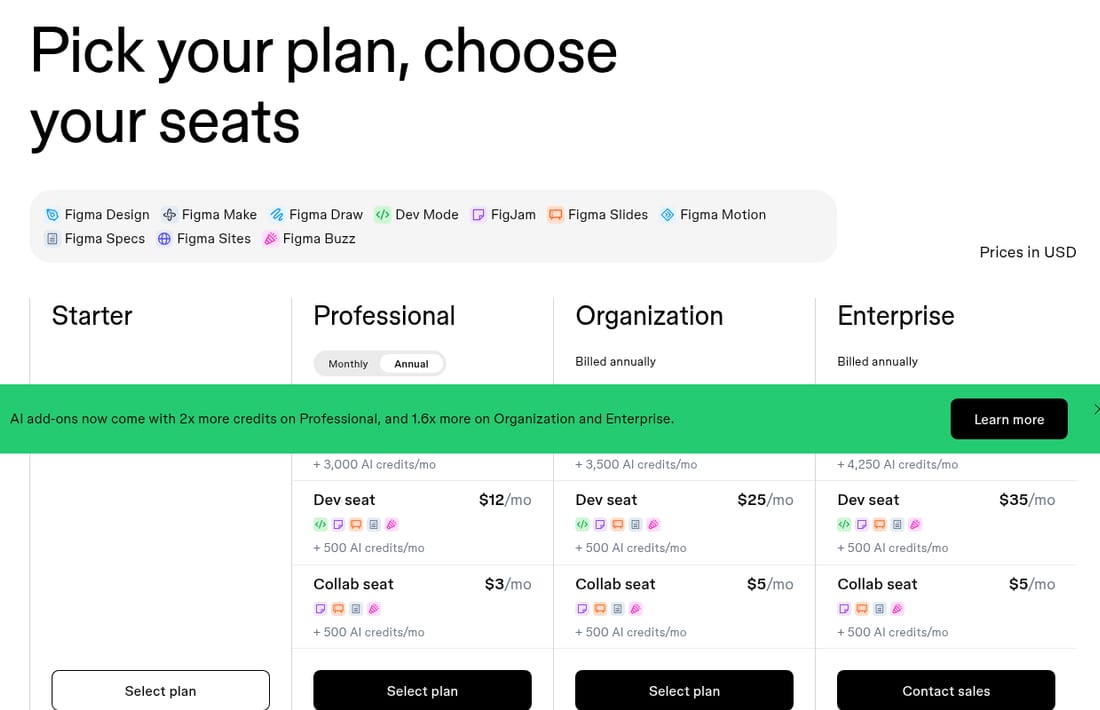
A designer reads the order of attention: what the eye meets first, which plan is set apart, and whether the price or the pitch leads. The Miro sample’s Designer analyst read the features page, so this reading comes from the Figma sample, captured the same day. Its Designer analyst found the plan grid starting directly under the hero, with the four plans named in one row, and the add-ons, the comparison grid and the FAQ after it. A reader can take that as a page that puts the choice of a plan before the explanation of the plans. Write down what the eye meets first after the headline, and whether the explanation comes before the choice or after it.
Figma · Designer · Captured
The plan grid starts directly under the hero
The plan grid starts directly under the hero, with Starter, Professional, Organization and Enterprise named in one row. The add-ons, the 'Compare all features' grid and the FAQ all come after it.
No evidence attached
From one pricing page to a competitor pricing analysis
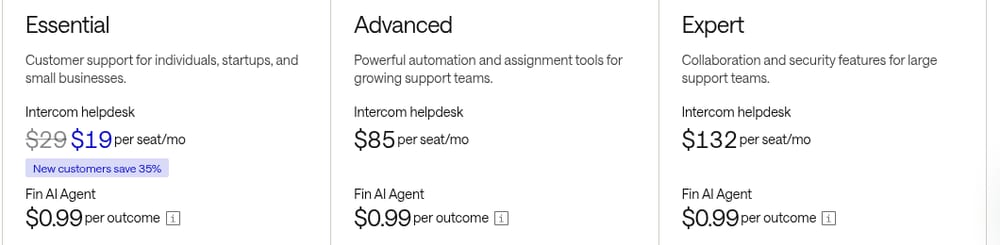
A competitor pricing analysis reads several pricing pages with the same questions, captured on the same day, so that their prices can be set side by side. The Intercom sample was also captured on 29 October 2026. Its PM analyst found two prices on every plan: a price per seat a month, with a new-customer offer beside the entry plan’s list price, and Fin AI Agent at a price per outcome under it. Beside Miro, the two pages charge in different units: Miro per member, billed yearly, and Intercom per seat plus a price per outcome. Compare seat price with seat price, list price with list price and offer with offer, and keep the usage price apart, with the unit and billing period of each. A rival’s price quoted without its unit, period and date is a number nobody can check.
Intercom · PM · Captured
Each plan pairs a seat price with a price per Fin outcome
With 'Pay annually' switched on, Essential shows '$29' struck through beside '$19 per seat/mo' and 'New customers save 35%', Advanced '$85 per seat/mo' and Expert '$132 per seat/mo'. Under each seat price, Fin AI Agent reads '$0.99 per outcome'.
Evidence:
per seat/mo
· Seen on intercom.com/pricing, pricing page plan grid, after the Essential, Advanced and Expert seat prices · Captured · Indirect evidence
Re-check the price before you quote it
A finding describes the page on its capture date, so open the live page again before a price goes into a deck, a sales sheet or your own pricing decision, and write the new date beside the old one. On 29 October 2026, after the captures, Miro’s headline, toggle and plan prices and Intercom’s plan prices read as the three observations below show, with their sources; the rest of each finding stays dated by its capture. When a re-check finds a change, keep both readings with their dates instead of overwriting the first. SaaS pricing page examples applies the same reading to twelve pricing pages, one observation each, and the product teardown framework covers how to hand a reading on. coExploro’s methodology states what a capture can and cannot show.
Observed by us
Miro’s pricing page carried the headline ‘Where teams and AI work as one’ and a billing toggle labelled ‘Yearly (save 20%)’.
Observed by us
Miro’s plan cards read ‘$8/month per member, billed yearly’ and ‘$20/month per member, billed yearly’.
Observed by us
Paid annually, Intercom’s Essential plan showed $29 and $19 per seat a month beside the line ‘New customers save 35%’, and its Advanced plan $85 per seat a month.
verified · Source: intercom.com/pricing (opens in a new tab)
Limits
What a pricing page teardown does not show
- A capture shows the prices one visitor saw on one day, in one currency and with one billing period selected; another visitor, another date or the other setting of the toggle can show other figures.
- A pricing page shows list prices and offers, not the discounts a sales team gives, what customers pay in the end or how many buy each plan.
- A reading of the page has no traffic or conversion data, so it cannot say which price or layout sells better.
- Findings drafted by AI analysts are readings of the capture, so check one against the live page before you quote a price from it.
See it on a real product
Starter's button reads 'Buy this plan', Business's 'Try for free' · Miro
Evidence:
Buy this plan
· Seen on miro.com/pricing/, pricing page, button on the Starter plan card · Captured · Direct evidenceThe hero opens with plan and seat selection · Figma
Evidence:
Pick your plan, choose your seats
· Seen on www.figma.com/pricing/, pricing page hero headline · Captured · Direct evidence
Miro
Online whiteboard and workspace
Overall score 71 · Captured
Miro's plan cards price Starter at $8 and Business at $20 per member a month, billed yearly, and its comparison table runs twelve sections.
Figma
Product design tools
Overall score 69 · Captured
Figma's pricing hero reads 'Pick your plan, choose your seats' above ten product names, and the comparison grid runs four tiers.
Intercom
Customer support platform
Overall score 68 · Captured
Intercom, paid annually: Essential at $19 a seat under a new-customer offer, down from $29, Advanced $85 and Expert $132, plus Fin at $0.99 per outcome.
Questions
What should a pricing page teardown look at?
The pricing headline, the plan cards, the comparison table and the FAQ, read four times: for what the plans commit a buyer to, how the price is framed, how a buyer compares the plans and what the layout puts first. Write each observation with the part of the page it came from and the date you saw it.
How is a pricing page teardown different from pricing page best practices?
A list of pricing page best practices says what pricing pages should do in general. A pricing page teardown says what one page does, on a dated capture, in the words of the page, and leaves the judgement to you. Read a rival’s page that way before you weigh it against any list.
How is a pricing page teardown different from a competitor pricing analysis?
A pricing page teardown reads one page in depth. A competitor pricing analysis sets several products’ prices side by side, which holds only when every page was read with the same questions and every price keeps its unit, its billing period and its capture date.
When should I re-check a competitor’s pricing page?
Before you quote a price from it. A finding describes the page on its capture date, and a pricing page can change without notice, so open the live page, compare it with the finding and write the new date beside the old one.
Can an AI tool do a pricing page teardown?
It can draft one. coExploro captures a product’s homepage, then its pricing and features pages when it finds them, and four AI analysts, PM, Marketing, UX and Designer, write findings from that capture. Check a finding against the live page before you quote a price from it: the analysts read a capture, not your sales data.
Run your own
Start with one product.
See how a competitor's homepage and pricing page are built to convert. Paste its address: coExploro captures its public pages, such as the homepage and pricing page, and four AI analysts read them for calls to action, pricing and trust signals. It takes 2–4 minutes.