Guide
SaaS landing page examples, with one finding each
By coExploro · Published
Reviewed and edited by coExploro · Independent, not affiliated · Public methodology · Corrections: support@coexploro.com
Eleven SaaS homepages from coExploro’s public samples, captured on 28 and 29 October 2026, with one finding each, grouped by what a visitor meets first: the headline, the first step, the proof and the header.
What does the first screen say?
The first screen says what the product is and who it is for, in a few words. The Linear sample found a headline that names both: ‘The product development system for teams and agents’. GitHub’s line under its headline put agents beside developers and code, and OpenAI’s homepage opened on a message box under ‘What can I help with?’. By 1 November 2026 GitHub’s live headline had changed, as the check below shows, so each reading belongs to its capture date.

Linear homepage
PM · Captured
The hero headline names both the category and the audience
The headline reads 'The product development system for teams and agents', and the line under it reads 'Purpose-built for planning and building products. Designed for the AI era.'
Evidence:
The product development system for teams and agents
· Seen on linear.app, homepage hero headline · Captured · Direct evidence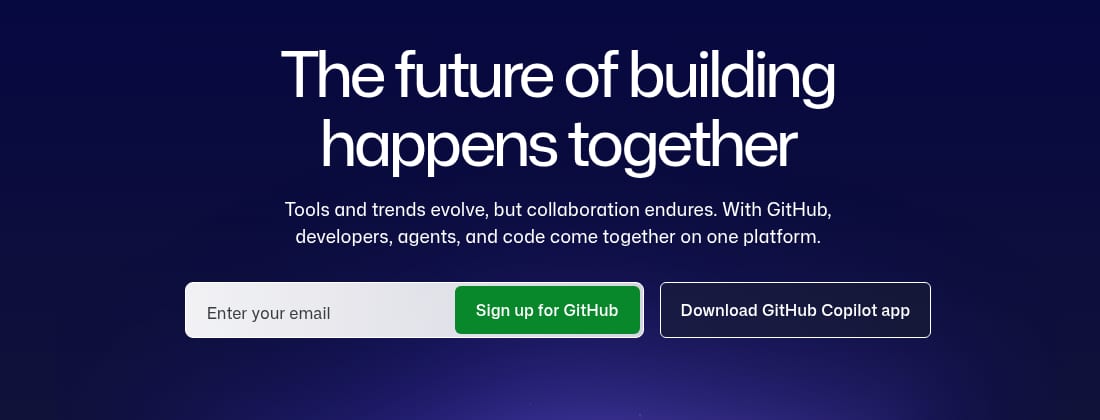
GitHub homepage
PM · Captured
The hero names agents beside developers and code
Under 'The future of building happens together', the hero reads 'Tools and trends evolve, but collaboration endures. With GitHub, developers, agents, and code come together on one platform.'
Evidence:
With GitHub, developers, agents, and code come together on one platform.
· Seen on github.com, homepage hero, the line under the headline · Captured · Direct evidence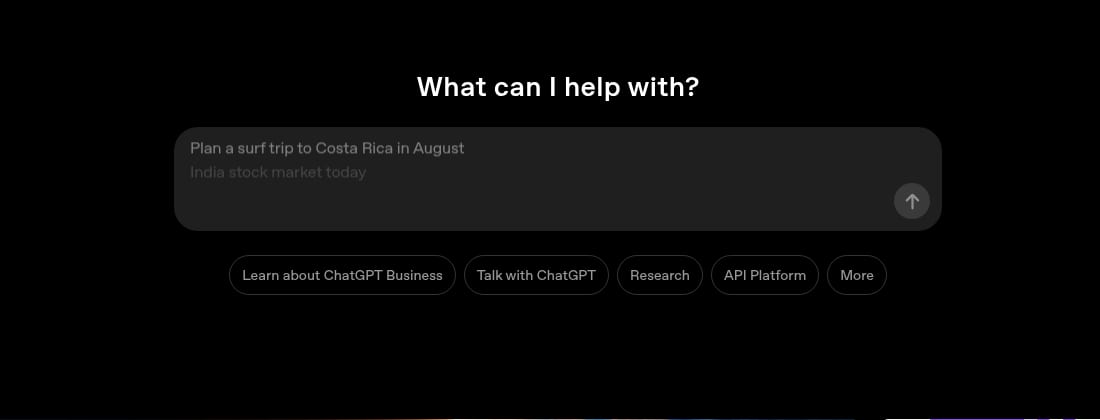
OpenAI homepage
PM · Captured
The homepage opens on a chat box under What can I help with?
The first block under the navigation is the heading 'What can I help with?' above a message box. In the capture the box shows the example 'Plan a surf trip to Costa Rica in August', with a second, 'India stock market today', fading in under it, beside a send arrow.
Evidence:
What can I help with?
· Seen on openai.com, homepage, first block under the navigation · Captured · Direct evidence
Observed by us
Linear’s homepage headline still read ‘The product development system for teams and agents’.
verified · Source: linear.app (opens in a new tab)
Observed by us
GitHub’s homepage headline read ‘Software still starts with you’, above the Sign up for GitHub and Download GitHub Copilot app buttons.
verified · Source: github.com (opens in a new tab)
Put your homepage beside these examples
Every card on this page comes from a product teardown that coExploro ran on a public sample, and you can run the same reading on your own homepage or a competitor’s. Enter the address in the form on this page. coExploro captures that page with the date, adds the site’s pricing and features pages if it finds them, and has four AI analysts, PM (product manager), Marketing, UX and Designer, write findings from what it captured; a teardown usually takes 2–4 minutes. The run also scores the captured pages in six UX dimensions and marks a dimension the capture cannot show as not observed. Three of those dimensions match the groups below: CTA (call to action) effectiveness, trust signals and navigation clarity. Lay your findings beside these cards to compare your first screen, first step, proof and header with theirs. Without an account you can try one run a day per network; with a free account you get 3 teardowns a month, and paid plans start at $16 a month billed yearly. The website UX audit page shows what a run returns, and how to do a landing page audit reads one page in the four roles.
What does it take to start?
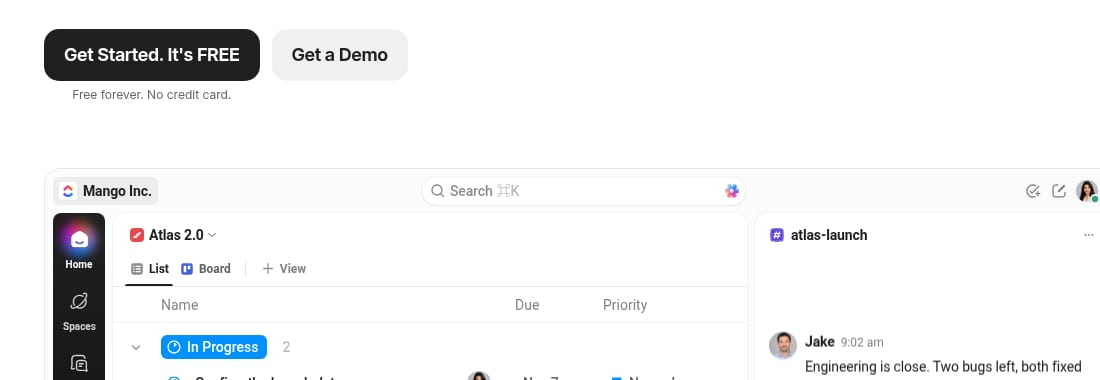
Next to the first button, these homepages state the terms of starting. ClickUp’s hero offered a black ‘Get Started. It's FREE’ button and a grey ‘Get a Demo’ button, with the line ‘Free forever. No credit card.’ under the first. monday.com set ‘No credit card needed’ and ‘Unlimited time on Free plan’ under its one Get Started button. Calendly put ‘Sign up with Google’ and ‘Sign up with Microsoft’ in the hero, with ‘No credit card required’ on the line below. None of these findings is about a plan price on the first screen; the SaaS pricing page examples read plan prices on pricing pages, card by card. Note what a page says at its first button about payment and time, and whether a demo request sits beside the free start or replaces it.
ClickUp homepage
UX · Captured
The hero pairs a free start with a demo request
Under the hero copy sit a black 'Get Started. It's FREE' button, with 'Free forever. No credit card.' below it, and a grey 'Get a Demo' button. The top bar repeats 'Get a Demo' beside 'Login' and 'Sign Up'.
Evidence:
Get a Demo
· Seen on clickup.com, homepage hero, the second button · Captured · Direct evidence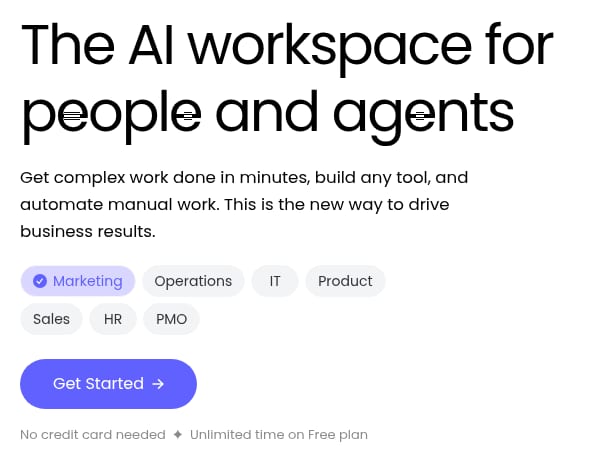
monday.com homepage
Marketing · Captured
A no-credit-card line sits under the hero button
The headline 'The AI workspace for people and agents' sits above one 'Get Started' button. Under the button, small type reads 'No credit card needed' and 'Unlimited time on Free plan'.
Evidence:
No credit card needed
· Seen on monday.com, homepage hero, under the Get Started button · Captured · Direct evidence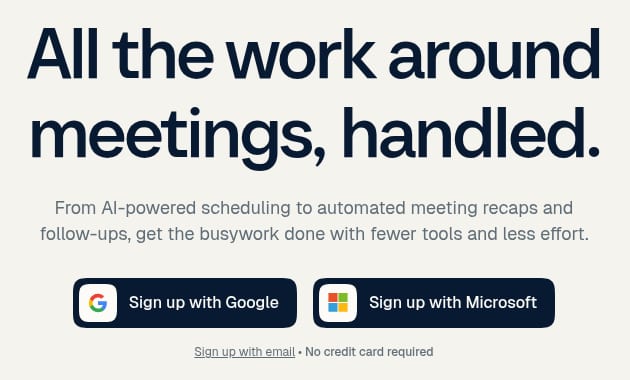
Calendly homepage
Marketing · Captured
Google and Microsoft sign-up sit in the hero
Under the headline, two buttons read 'Sign up with Google' and 'Sign up with Microsoft'. The line below them carries a 'Sign up with email' link and the words 'No credit card required'.
Evidence:
Sign up with Microsoft
· Seen on calendly.com, homepage hero, second sign-up button · Captured · Direct evidence
Observed by us
ClickUp’s homepage hero showed the line ‘Free forever. No credit card.’ and a ‘Get started. It's FREE’ button.
verified · Source: clickup.com (opens in a new tab)
Observed by us
Calendly’s homepage top bar showed ‘Log In’ beside a ‘Get started for free’ button.
verified · Source: calendly.com (opens in a new tab)
Where does the proof sit?
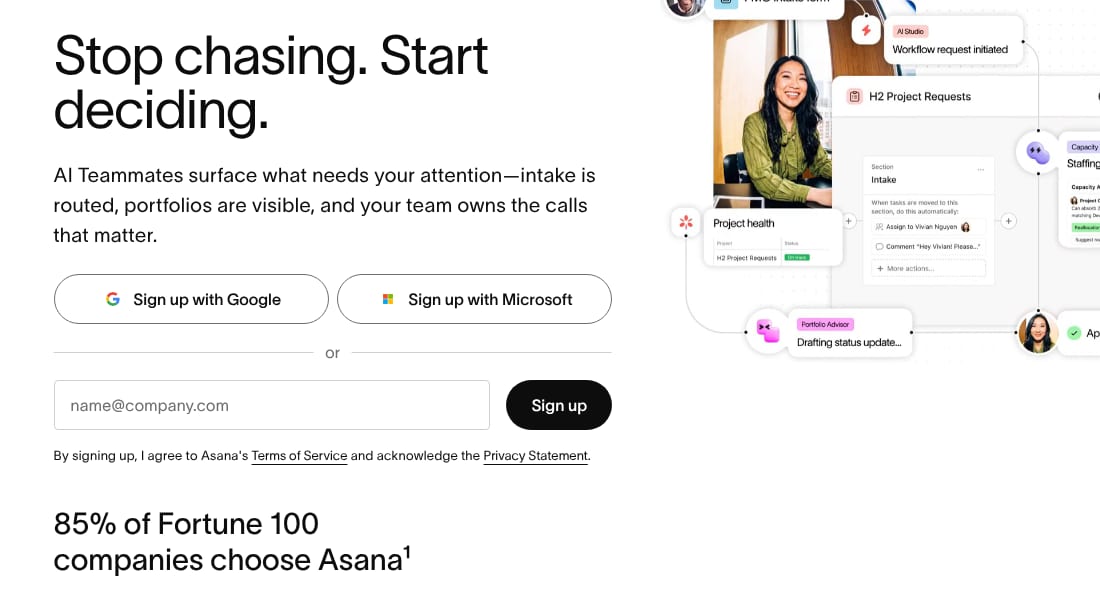
Proof is what a homepage shows about who else uses the product and what they got. Asana put ‘85% of Fortune 100 companies choose Asana’ directly under its sign-up form. Slack’s homepage gave three figures in a band further down, with footnotes that credit one to ‘Salesforce Internal’ and two to a ‘2026 Forrester Total Economic Impact Study’. Webflow’s customer cards each led with a figure, such as 32 global sites launched in 10 days for Verifone, above a quote and a named person. Write down where the proof sits, how far it is from the first button, and whether each figure names its source.
Asana homepage
Designer · Captured
The 85% of Fortune 100 line sits under the sign-up form
Under 'Stop chasing. Start deciding.', the sign-up block offers 'Sign up with Google', 'Sign up with Microsoft' and an email field. The line '85% of Fortune 100 companies choose Asana' sits below the form, with a footnote mark.
Evidence:
85% of Fortune 100 companies choose Asana
· Seen on asana.com, homepage, the line under the sign-up form · Captured · Direct evidence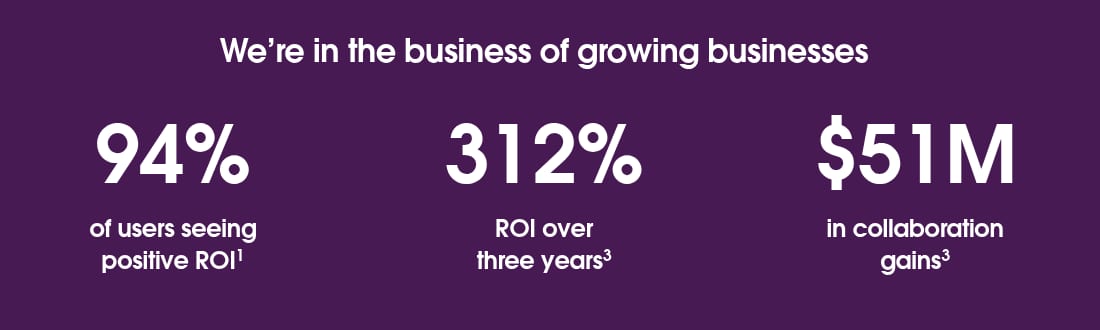
Slack homepage
Marketing · Captured
Three figures report ROI and collaboration gains
Under 'We’re in the business of growing businesses', the homepage shows '94%' of users seeing positive ROI, '312%' ROI over three years and '$51M' in collaboration gains. Footnotes credit the first to 'Salesforce Internal' and the other two to a '2026 Forrester Total Economic Impact Study'.
Evidence:
of users seeing positive ROI
· Seen on slack.com, homepage figures band, under the 94% figure · Captured · Direct evidence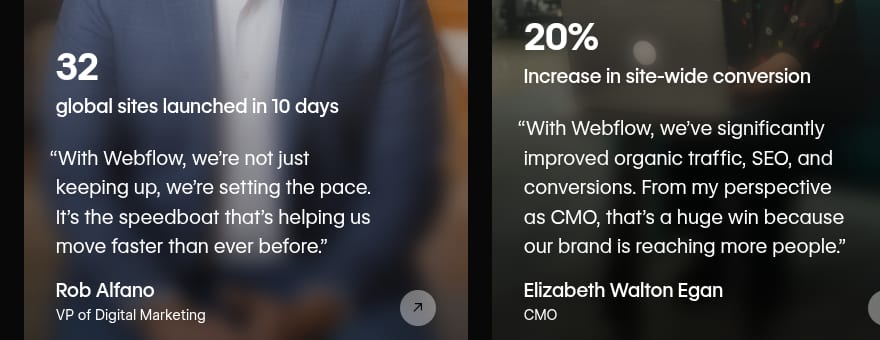
Webflow homepage
Marketing · Captured
Customer outcomes are published as figures
Under the heading '300,000+ brands move the needle with Webflow', customer cards each lead with a figure: 32 global sites launched in 10 days for Verifone, a 20% increase in site-wide conversion for Lattice, and $6M in cost savings annually on a third card cut off at the right edge. Each figure sits above a quote and a named person, the first Rob Alfano, VP of Digital Marketing.
Evidence:
global sites launched in 10 days
· Seen on webflow.com, homepage customer results carousel, first card, under the 32 figure · Captured · Direct evidence
Observed by us
Asana’s homepage still carried the line ‘85% of Fortune 100 companies choose Asana’.
verified · Source: asana.com (opens in a new tab)
Observed by us
Slack’s homepage band under ‘We’re in the business of growing businesses’ showed 94% of users seeing positive ROI and 312% ROI over three years.
verified · Source: slack.com (opens in a new tab)
What else does the header ask for?
The header gathers a homepage’s navigation links and actions in one place, so it shows how many paths the page offers at once. Intercom’s header set four section links, ‘Product’, ‘Customers’, ‘Resources’ and ‘Pricing’, beside ‘Log in’, ‘Contact sales’, ‘View demo’, a dark ‘Start free trial’ button and a boxed link to Fin AI Agent. Crayon’s demo button read ‘Get a Demo’ in the navigation and ‘GET A DEMO’ in the hero and the closing banner: the same words in title case and in capitals. Count the actions in a header and check that a repeated action keeps the same words and capitalization across the page. The UX audit guide covers navigation with the other parts of a page, and coExploro’s methodology states what a capture can and cannot show.

Intercom homepage
UX · Captured
The header sets four section links beside five actions
The homepage header lists 'Product', 'Customers', 'Resources' and 'Pricing' at the left. At the right sit 'Log in', 'Contact sales', 'View demo' and a dark 'Start free trial' button, followed by a boxed link to Fin AI Agent.
Evidence:
View demo
· Seen on intercom.com, homepage header, right side · Captured · Indirect evidence
Crayon homepage
Designer · Captured
The demo button label switches between title case and capitals
The navigation button reads 'Get a Demo', and so does the green button under the heading 'We beat our competitors.' further down. The hero button and the closing-banner button read 'GET A DEMO'.
Evidence:
No more manual competitor research
· Seen on www.crayon.co, closing banner heading, above the GET A DEMO button · Captured · Page context
Observed by us
Intercom’s homepage header showed ‘Log in’, ‘Contact sales’, ‘View demo’ and ‘Start free trial’ beside a link to Fin AI Agent.
verified · Source: intercom.com (opens in a new tab)
What repeats across these homepages
A few choices appear on more than one of these cards. Linear, GitHub and monday.com name agents in a headline or in the line under it. ClickUp, monday.com and Calendly put a no-credit-card line next to the first button. ClickUp, Intercom and Crayon offer a demo or a sales contact beside a free start, or in its place. These are examples from captures made on two days in October 2026, not a count of SaaS homepages, and they do not show which choice converts better.
Limits
What these landing page examples do not show
- Each card shows a homepage on its capture date, 28 or 29 October 2026. The checks under the groups read the live pages on 1 November 2026 from a network in Europe, and GitHub’s headline had already changed by then.
- These captures carry no traffic or conversion analytics for the homepages, and a customer figure shown on a page is that company’s own claim.
- The homepages come from coExploro’s public samples, so the set reflects the products sampled, not the best SaaS landing pages.
- A frame shows one part of a homepage at one screen width; it does not show a campaign landing page, another width or what follows a click.
See it on a real product
The hero headline names both the category and the audience · Linear
Evidence:
The product development system for teams and agents
· Seen on linear.app, homepage hero headline · Captured · Direct evidenceThe hero names agents beside developers and code · GitHub
Evidence:
With GitHub, developers, agents, and code come together on one platform.
· Seen on github.com, homepage hero, the line under the headline · Captured · Direct evidence
Linear
Issue tracking and product operations
Overall score 72 · Captured
Linear's homepage, features and pricing pages: a hero for teams and agents, one hero link to Loops, and Basic and Business priced per user a month.
GitHub
Developer platform
Overall score 72 · Captured
GitHub's homepage, features and pricing pages: a hero that names agents, one case study card with a figure, and a different button wording on each plan.
OpenAI
AI models and API platform
Overall score 69 · Captured
OpenAI's homepage as captured: a chat box under What can I help with?, a featured story grid, and business stories naming Virgin Atlantic and Zapier.
Questions
What makes a good SaaS landing page?
On the page itself, look for clarity: a headline that says what the product does and for whom, the terms of starting next to the first button, proof that names its source, and a header with few competing actions. Whether a page converts is a different question, which a capture of the page cannot answer, because it has no traffic or conversion data.
Is a homepage a landing page?
A homepage is a landing page whenever it is the first page someone visits, while a campaign landing page is built for one offer. These examples are homepages, because a coExploro teardown starts from the address you give it and reads that page first.
Why does this page show no plan prices?
None of the homepage findings in coExploro’s public samples is about a plan price, so the group on starting reads the terms each homepage shows instead: a free start, no credit card or a demo. coExploro’s SaaS pricing page examples read plan prices from pricing pages, card by card.
How current are these examples?
Each card shows a homepage on its capture date, 28 or 29 October 2026. The checks under the groups read the live pages on 1 November 2026, and by then GitHub’s headline had changed. Open the live page before you quote it.
Can I run a landing page audit of my own homepage here?
You can run a product teardown of a public homepage here, yours or a competitor’s: enter its address in the form on this page, and four AI analysts write findings from a dated capture. One run a day per network works without an account. A landing page audit in the checklist sense, with speed, accessibility and search checks, is a different job; the landing page teardown guide explains the difference.
Run your own
Start with one product.
Tear down your homepage, or a competitor’s. Paste a homepage address. coExploro captures that page with its date, and four AI analysts draft findings from the capture. A teardown usually takes 2–4 minutes.