Guide
Competitor pricing analysis for SaaS: compare costs for the same team
By coExploro · Published
Reviewed and edited by coExploro · Independent, not affiliated · Public methodology · Corrections: support@coexploro.com
A competitor pricing analysis, also called a competitor price analysis, sets rival products’ published prices side by side for one buyer: the same team size, billing period, currency and date. This guide compares SaaS plans and billing terms. It does not cover retail price trackers. Below, three work management rivals are read for one team of ten, as their pages showed on 6 November 2026 to a network in Europe.
- List the products your buyer is considering — the names in the same purchase, not every company in the market.
- Define one buyer — team size, billing period, billing country, required features and AI use.
- Read every pricing page on one day — record the date and currency, then set each page’s controls to your buyer.
- Fill one row per question — price model and unit, plans with no price, yearly saving, free entry and AI allowance.
- Convert to one currency — write down the rate you used and its date.
- Add your own product and re-check — use your own copy of the table, then open the live pages again before you quote them.
The same team on all three pages
A price comparison holds only for the buyer it assumes, so set that buyer before you read a figure. Here it is a team of ten on yearly billing, with no billing country or tax set. All three pages opened on yearly prices and charge per person, but the printed figures cannot go side by side yet. Asana showed US dollars, ClickUp a dollar sign and monday.com euros, and its footnote ties the price to the billing country, so these figures do not say which rival costs less. Pick one currency, and compare the lowest plan on each page that meets your buyer’s needs. ClickUp’s label says up to 33%, while its yearly price sits 25% below monthly on ‘Core’ and 32% on Business. Asana’s sits 18.5% below on Starter and 18% on Advanced. monday.com’s label says 18%, while its printed prices work out to 25% on Basic, then with 10-seat special offers, 14% on Standard and 21% on Pro. monday.com says yearly billing means paying upfront.
One team of ten on three work management pricing pages, 6 November 2026
Asana
- Currency shown
- US dollars
- Price model and unit
- A plan price per user, per month
- Stated yearly saving
- ‘Save up to 18%’
- AI allowance
- Requests per user, capped per account, plus AI Studio credits
- Free entry
- Personal: ‘Free forever’, for 2 users, too small for this team
- Plans with no price
- Enterprise, ‘Contact sales for pricing’, and Enterprise+, named with no price
monday.com
- Currency shown
- Euros
- Price model and unit
- A plan price per seat, per month, from a team-size picker; ‘Plans start from 3 users’
- Stated yearly saving
- ‘Yearly SAVE 18%’
- AI allowance
- Credits per plan
- Free entry
- Free: ‘free forever’, ‘Up to 2 seats’, too small for this team
- Plans with no price
- One of five cards: Enterprise, ‘custom price’
ClickUp
- Currency shown
- Dollars, shown as a $ sign
- Price model and unit
- A plan price per user, per month
- Stated yearly saving
- ‘Save up to 33% with yearly’
- AI allowance
- Credits per user, pooled, on paid plans
- Free entry
- Free Forever: ‘Unlimited Free Members’, ‘60 MB Storage’
- Plans with no price
- One of five cards: Enterprise, ‘Custom’, under a priced MAX plan
coExploro
- Currency shown
- The currency its browser was served; you convert it
- Price model and unit
- The plan cards are in the capture when coExploro finds the pricing page; you work out team totals
- Stated yearly saving
- A capture can show the label; you work out the saving on each plan
- AI allowance
- A capture can show the allowance line, not your team’s use
- Free entry
- A capture can show the free plan’s card, not signup or checkout
- Plans with no price
- A capture can show the words on the card; no sales form is sent
| Asana | monday.com | ClickUp | coExploro | |
|---|---|---|---|---|
| Currency shown | US dollars | Euros | Dollars, shown as a $ sign | The currency its browser was served; you convert it |
| Price model and unit | A plan price per user, per month | A plan price per seat, per month, from a team-size picker; ‘Plans start from 3 users’ | A plan price per user, per month | The plan cards are in the capture when coExploro finds the pricing page; you work out team totals |
| Stated yearly saving | ‘Save up to 18%’ | ‘Yearly SAVE 18%’ | ‘Save up to 33% with yearly’ | A capture can show the label; you work out the saving on each plan |
| AI allowance | Requests per user, capped per account, plus AI Studio credits | Credits per plan | Credits per user, pooled, on paid plans | A capture can show the allowance line, not your team’s use |
| Free entry | Personal: ‘Free forever’, for 2 users, too small for this team | Free: ‘free forever’, ‘Up to 2 seats’, too small for this team | Free Forever: ‘Unlimited Free Members’, ‘60 MB Storage’ | A capture can show the free plan’s card, not signup or checkout |
| Plans with no price | Enterprise, ‘Contact sales for pricing’, and Enterprise+, named with no price | One of five cards: Enterprise, ‘custom price’ | One of five cards: Enterprise, ‘Custom’, under a priced MAX plan | A capture can show the words on the card; no sales form is sent |
Each rival’s cells come from the dated observations on this page, read on the live pricing pages from a network in Europe.
Observed by us
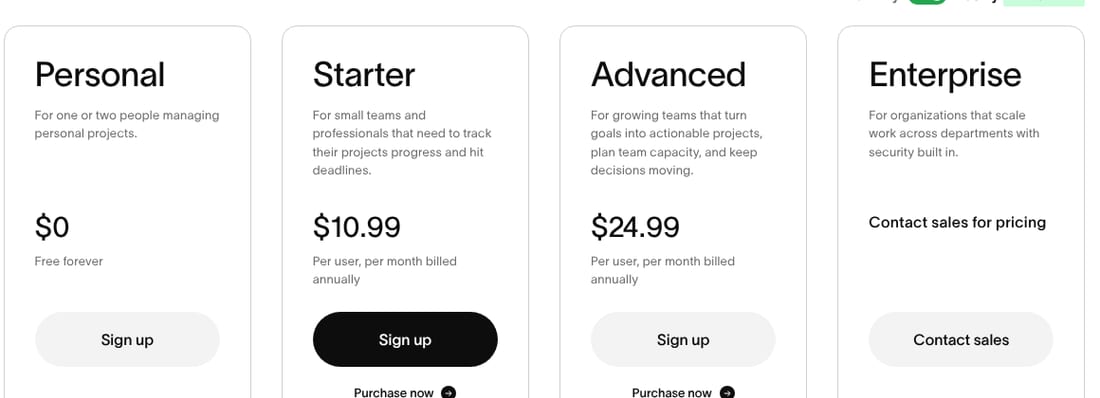
Asana, ten users billed yearly: US$10.99 per user a month on Starter comes to US$109.90 a month by our arithmetic and US$24.99 on Advanced to US$249.90, with US$13.49 and US$30.49 per user billed monthly.
Observed by us
Asana’s toggle read ‘Save up to 18%’, Personal read ‘Free forever’ for 2 users, Enterprise read ‘Contact sales for pricing’ and Enterprise+ was named with no price.
Observed by us
monday.com, ten seats billed yearly: ‘Total of €90 / month, billed annually’ on Basic, €120 on Standard with ‘€20 off / month’ and €190 on Pro with ‘€30 off / month’, with €12, €14 and €24 a seat billed monthly.
Observed by us
monday.com’s toggle read ‘Yearly SAVE 18%’, Free read ‘free forever’ and ‘Up to 2 seats’, Enterprise read ‘custom price’, and the page read ‘Plans start from 3 users’, ‘you will pay for one year upfront’ and ‘The price is determined by the user's billing country’.
Observed by us
ClickUp, ten users billed yearly: $9 per ‘user / mo · billed yearly’ on ‘Core’ comes to $90 a month by our arithmetic and $17 on Business to $170, with $12 and $25 per user billed monthly.
Observed by us
ClickUp’s label read ‘Save up to 33% with yearly’, Free Forever read ‘Unlimited Free Members’ and ‘60 MB Storage’, and Enterprise read ‘Custom’.
Where coExploro fits: the first pass
coExploro is a product teardown tool, and it gives you the first pass on each rival’s public pages. Enter a homepage address, and a teardown usually takes 2–4 minutes. It captures that page with its date, then the pricing and features pages when it finds them, and four AI analysts, PM, Marketing, UX and Designer, draft findings from that capture, such as the plan labels on the ClickUp sample. Compare, included with Pro, starts 2 to 5 product teardowns in one batch and sets them side by side. A capture shows a page as it opened: coExploro does not move a billing toggle or a team-size picker. It does not fill your price table or say which price sells, and it reads public offers but sees no negotiated deals, private discounts or anything behind a login. You can try one run a day per network without an account, a free account includes 3 teardowns a month, and paid plans start at $16 a month billed yearly.
Page defaults and rival calculators each show one scenario
monday.com’s picker opened on 10 seats with ‘Most Popular’ over Pro, and when we moved it by hand to 3 seats the same label sat over Standard. A default setting describes one scenario, not every buyer, so set the controls to yours and write the setting beside each reading. A rival’s own comparison is a scenario too: ClickUp’s pricing page holds a calculator that lists other tools at a price per user and opened on 500 people. Take each company’s price from that company’s own page.
Observed by us
On monday.com’s pricing page, ‘Most Popular’ sat over Pro at 10 seats and over Standard at 3 seats.
Observed by us
ClickUp’s pricing-page calculator listed ‘Asana · $10.99 / user’ and ‘monday.com · $9 / user’ and opened on ‘500 people’.
Add the second meter: AI usage
A seat price may not be the whole cost: each page adds an AI allowance, in different units. Asana lists requests per user up to a cap for the account, plus AI Studio credits. monday.com lists monthly credits by plan. ClickUp’s paid plans pool credits per user. These readings omit how much work a request or a credit buys, so compare the rules instead: who owns the allowance, what more costs, and whether one heavy user raises the team’s bill. Set the same AI tasks for each rival, and mark the cost as unknown where a page gives no way to work it out.
Observed by us
Asana’s Starter and Advanced cards included ‘5 requests per user per month, up to 50 requests per account’ and 50K and 75K AI Studio credits, and the page listed more requests at $0.50 each prepaid or $0.60 billed monthly.
Observed by us
monday.com’s plan cards listed 1 000, 2 000 and 3 000 AI credits a month on Basic, Standard and Pro.
Observed by us
ClickUp’s plan cards listed 1K credits on ‘Core’ and 1.5K on Business, each per ‘user / mo · pooled’, and the page offered more at $10 per 10K credits.
What a page says around Contact sales
A hidden price still leaves public facts to record: the words on the card, what the page asks for before a quote, and any published limit or separately priced plan nearby. Asana prices neither Enterprise nor Enterprise+. monday.com asks for a quote through a form, which showed nine inputs on the 29 October sample. ClickUp’s Enterprise plan reads ‘Custom’, yet MAX, the plan above it, prints a price and opens with ‘Everything in Enterprise, plus:’. That does not show what Enterprise costs or cap a quote, but it is another published option to weigh.
Asana · UX · Captured
Three of the four plans show a price on the page
The capture shows the billing switch on Yearly, labelled 'Save up to 18%'. Personal shows $0 and 'Free forever', and Starter and Advanced show $10.99 and $24.99 'Per user, per month billed annually'. Enterprise shows 'Contact sales for pricing'.
Evidence:
per month billed annually
· Seen on asana.com/pricing, plan cards, under the Starter and Advanced prices · Captured · Indirect evidence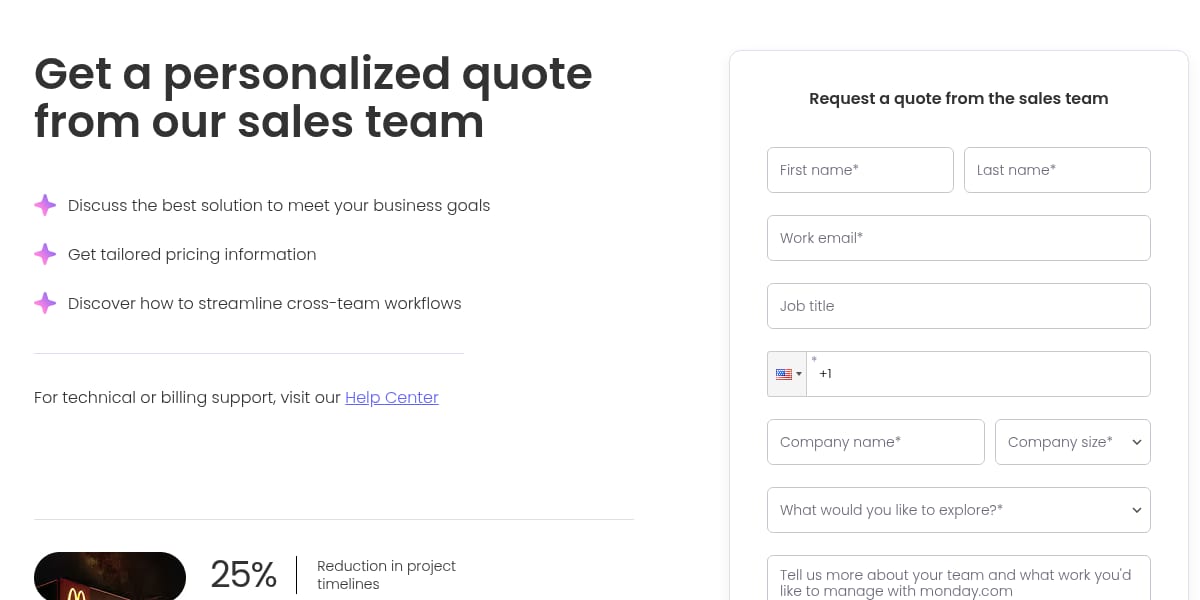
monday.com · UX · Captured
The sales quote form asks for nine inputs
The form headed 'Request a quote from the sales team' holds first name, last name, work email, job title, phone, company name, company size, 'What would you like to explore?' and a free-text box, then 'Submit'. Seven of the nine carry an asterisk. Job title and the free-text box do not.
Evidence:
Get a personalized quote from our sales team
· Seen on monday.com/pricing, pricing page, heading to the left of the quote form · Captured · Page context
Observed by us
ClickUp’s MAX card showed $100 per ‘user / mo · billed yearly’, with ‘Everything in Enterprise, plus:’ above its feature list, while Enterprise showed ‘Custom’.
Add your own product, then re-check
Copy the table and add your product in your own version, in the same rows, including the rows that make you look worse. Note where your price differs, why, and what you still do not know. For the wider method, see how to do a competitor analysis and the filled-in matrix. How to do a pricing page teardown reads one page in depth, SaaS pricing page examples shows twelve, and coExploro’s methodology states what a capture can and cannot show.
Limits
What a competitor pricing analysis cannot show
- Published prices can include public offers, and they do not show a negotiated price, a final bill or a renewal cost.
- These readings come from one network in Europe on 6 November 2026; another billing country can show another currency, tax treatment or offer.
- The ten-seat totals cover plans with different features, so they show published cost for those plans, not value.
See it on a real product
Three of the four plans show a price on the page · Asana
Evidence:
per month billed annually
· Seen on asana.com/pricing, plan cards, under the Starter and Advanced prices · Captured · Indirect evidenceThe sales quote form asks for nine inputs · monday.com
Evidence:
Get a personalized quote from our sales team
· Seen on monday.com/pricing, pricing page, heading to the left of the quote form · Captured · Page context
Asana
Work and project management
Overall score 69 · Captured
Asana presents AI Teammates as named team roles, prices three of its four plans, and opens its pricing FAQ with three questions on AI requests.
monday.com
Work management platform
Overall score 69 · Captured
monday.com lists six AI controls on its homepage, puts a no-credit-card line under its hero button, and asks for nine inputs on its sales quote form.
ClickUp
Work management platform
Overall score 69 · Captured
ClickUp's homepage, Tasks and pricing pages: a hero about AI that acts on your work, Business marked Most Popular at $17 billed yearly, and six logos.
Questions
What is a competitor price analysis?
It is the same work as a competitor pricing analysis: setting rivals’ published prices side by side so they can be compared fairly. This guide compares SaaS plans and billing terms. It does not cover retail price tracking across online shops.
How many competitors should a pricing analysis cover?
Use the buyer’s actual shortlist, and keep it small enough to check every entry on the same date. One indirect rival, such as a cheaper tool that does part of the job, is worth adding when buyers name it.
Which price should I compare: monthly or yearly?
Record both, then compare costs over the same period. Mixing monthly and yearly billing distorts the comparison, and a yearly price shown per month is not what a buyer pays upfront. Treat a label such as ‘up to’ as a summary, and work out the saving from each plan’s two prices.
How do I compare a rival that hides its price?
Do not guess a figure. Record the words the page uses, what it asks a buyer to give before a quote, and any published limit or separately priced plan. A higher plan’s price does not cap a custom quote. Only a sales conversation or customers can fill the gap.
Can an AI tool do a competitor pricing analysis?
It can do the reading, not the deciding. coExploro captures a rival’s homepage, plus its pricing and features pages when it finds them, with their date, and drafts findings about plans and prices, which you check against the live page. It has no view of negotiated deals, private discounts or what customers pay in the end.
Run your own
Start with one product.
Start with one rival’s homepage. Enter a rival’s homepage address. coExploro captures that page and the pricing and features pages it finds, and four AI analysts draft findings on its plans, its prices and what its public pages claim. A teardown usually takes 2–4 minutes.