Guide
SaaS competitor analysis: read two products side by side
By coExploro · Published · Updated
Reviewed and edited by coExploro · Independent, not affiliated · Public methodology · Corrections: support@coexploro.com
A SaaS competitor analysis sets software products of one category side by side on the questions a buyer weighs before signing up: what each leads with, what it charges for, what each plan includes and what a visitor can start alone. The worked example below reads coExploro’s Zapier and n8n samples, two workflow automation products captured on 29 October 2026, with both pricing pages read again live the same day.
The four questions of a SaaS competitor analysis
A SaaS competitor analysis compares products a buyer could pick for the same job, so it starts from the questions a buyer brings to their websites. The first is positioning: what each product leads with, in the words of its own headline. The second is the pricing model: what each product charges for, whether seats, usage or a flat plan, because two prices in different units cannot be set side by side. The third is packaging: which plans it offers, what each one includes, and where a buyer is sent to sales. The fourth is the path to start: what a visitor can do without an account or a call. Ask all four of every product, keep to one category and one buyer’s job, and read every product on the same day, so that a change on one site does not pass for a difference between the two. This page sets products against each other; How to tear down a rival’s product, in five steps reads one rival’s pages in depth instead.
Run a SaaS competitor analysis in coExploro
coExploro reads each product’s public pages in the same four roles, so every product in the analysis gets the same questions. Give it a product’s homepage address, and in 2–4 minutes it makes a product teardown: it captures that page with its date, then the site’s pricing and features pages when it finds them, and four AI analysts, PM, Marketing, UX and Designer, write findings from that capture. Compare, included with Pro, runs that teardown for 2 to 5 products at once, so their captures share a day, and sets them side by side; add your own product to see its gaps and the others’ strengths. You can try one run a day per network without an account, a free account includes 3 teardowns a month, and paid plans start at $16 a month billed yearly. It reads public pages only: it sees no revenue, no churn and nothing behind a login.
Zapier and n8n on the four questions
Zapier and n8n both sell workflow automation, so a buyer can weigh one against the other for the same job. On 29 October 2026, after the captures, we read both pricing pages, where a buyer weighs the plans, and wrote one answer per question, in the pages’ own words where a quote carries the point. Each product answers all four differently. Zapier’s headline names a category, AI orchestration, while the line under n8n’s heading says what every plan shares. Zapier asks a buyer for a volume of tasks before it shows a price, while n8n prices by workflow executions. Both show four plan cards: Zapier says its Zaps, AI steps, code, MCP and SDK draw on one shared task allocation, while n8n sets a Startup plan and a self-hosted Community Edition below its cards. And Zapier keeps a free plan, while n8n’s hosted plans start with a free trial. The coExploro column says where a teardown reads each answer, and what it leaves out. Read the table across a row, not down a column: a row is one question put to both products.
Zapier and n8n on the four questions, read on 29 October 2026
Zapier
- Positioning
- Headline: ‘AI orchestration plans’
- Pricing model
- Asks ‘How many tasks do you need?’ before the first plan price
- Packaging
- Free, Professional, Team and Enterprise plan cards; Zaps, AI steps, code, MCP and SDK share one task allocation
- Path to start
- A Free plan marked ‘Free forever’, with ‘Try it free’
n8n
- Positioning
- Under the Pricing heading: ‘All plans include unlimited users & workflows and every integration’
- Pricing model
- ‘Pricing is based on monthly workflow executions, regardless of complexity’
- Packaging
- Starter, Pro, Business and Enterprise plan cards, then a Startup plan and the Community Edition
- Path to start
- ‘Start free trial’, with ‘No credit card required’ under it
coExploro
- Positioning
- The PM and Marketing analysts read the headline and the lines under it
- Pricing model
- Reads the pricing page for the unit each plan is priced in
- Packaging
- Reads the plan cards, the comparison table and the FAQ the capture holds
- Path to start
- Reads the buttons and the lines under them, not what follows a click
| Zapier | n8n | coExploro | |
|---|---|---|---|
| Positioning | Headline: ‘AI orchestration plans’ | Under the Pricing heading: ‘All plans include unlimited users & workflows and every integration’ | The PM and Marketing analysts read the headline and the lines under it |
| Pricing model | Asks ‘How many tasks do you need?’ before the first plan price | ‘Pricing is based on monthly workflow executions, regardless of complexity’ | Reads the pricing page for the unit each plan is priced in |
| Packaging | Free, Professional, Team and Enterprise plan cards; Zaps, AI steps, code, MCP and SDK share one task allocation | Starter, Pro, Business and Enterprise plan cards, then a Startup plan and the Community Edition | Reads the plan cards, the comparison table and the FAQ the capture holds |
| Path to start | A Free plan marked ‘Free forever’, with ‘Try it free’ | ‘Start free trial’, with ‘No credit card required’ under it | Reads the buttons and the lines under them, not what follows a click |
The Zapier and n8n cells restate the dated observations under this table. coExploro reads public pages only.
Observed by us
Zapier’s pricing page carried the headline ‘AI orchestration plans’.
Observed by us
Under its Pricing heading, n8n’s pricing page said ‘All plans include unlimited users & workflows and every integration’.
verified · Source: n8n.io/pricing (opens in a new tab)
Observed by us
Zapier’s pricing page asked ‘How many tasks do you need?’ above a slider, before the first plan price.
Observed by us
n8n’s pricing page said ‘Pricing is based on monthly workflow executions, regardless of complexity’.
verified · Source: n8n.io/pricing (opens in a new tab)
Observed by us
Zapier’s pricing page showed Free, Professional, Team and Enterprise plan cards and said that Zap workflows, AI steps, code, MCP and SDK all draw from the same task allocation.
Observed by us
n8n’s pricing page showed Starter, Pro, Business and Enterprise plan cards, and below them a Startup plan and the Community Edition.
verified · Source: n8n.io/pricing (opens in a new tab)
Observed by us
Zapier’s pricing page showed a Free plan marked ‘Free forever’ with a ‘Try it free’ button.
Observed by us
n8n’s Starter and Pro cards showed ‘Start free trial’ with ‘No credit card required’ under the button.
verified · Source: n8n.io/pricing (opens in a new tab)
Two pricing pages, two units
The pricing row of the table matters most when a buyer reaches for a calculator. A price means little until you know its unit, and these two products meter the same job differently, so a Zapier price and an n8n price answer different questions. A buyer who sets them side by side has to translate one unit into the other first, by estimating how many tasks or how many workflow executions a month the work takes. The two cards below are the samples’ pricing findings from 29 October 2026: the Zapier Marketing analyst on the question that comes before a price, and the n8n PM analyst on the gap between two neighbouring plans. Write every price with its unit, its billing period and its currency, and note what each page asks a buyer before it shows a price.
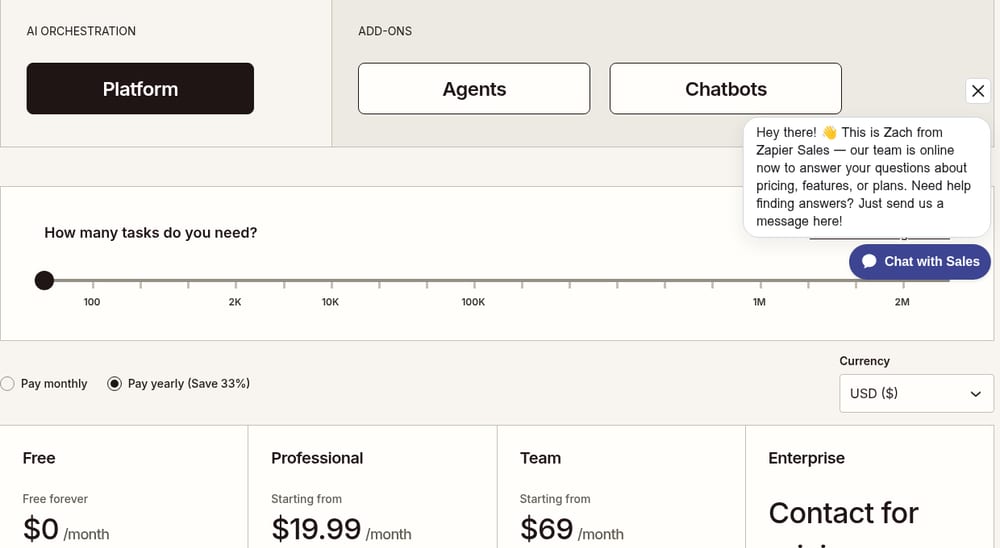
Zapier
Marketing · Captured
Plan selection starts with a task-volume slider
With the 'Platform' tab selected, the pricing page first asks 'How many tasks do you need?' above a slider marked from '100' to '2M'. The 'Pay monthly' and 'Pay yearly (Save 33%)' choice and the four plan cards with their prices come after it.
Evidence:
How many tasks do you need?
· Seen on zapier.com/pricing, pricing page, above the billing choice and the plan cards · Captured · Direct evidence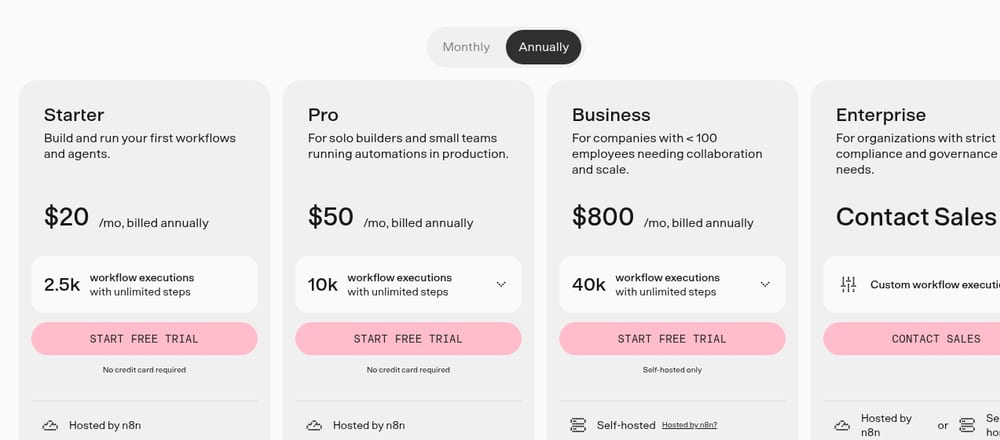
n8n
PM · Captured
Pro to Business is a sixteen-fold price step
With 'Annually' selected, Pro reads '$50 /mo, billed annually' for 10k workflow executions and Business '$800 /mo, billed annually' for 40k. Further down, a Startup plan card reads 'Under 20 employees? Check if you qualify for our Startup plan and get 50% off Business.'
Evidence:
/mo, billed annually
· Seen on n8n.io/pricing/, pricing page plan grid, beside the Pro and Business prices · Captured · Indirect evidence
Read both products on the same day
The n8n card above gives the prices in dollars, as coExploro’s capture saw them on 29 October 2026. The same day our network in Europe saw the same two plans in euros, at the figures in the observation below, so the two readings differ in currency and in amount, though not in date, and a comparison that mixed them would set unlike numbers side by side. Read every product of the analysis on the same day and from the same place, write the currency and the billing period beside each price, and keep both readings with their dates when a re-check finds a change instead of overwriting the first. A teardown carries its capture date for that reason, and a Compare captures all its products in one run. The Zapier sample shows one product read in all four roles, and coExploro’s methodology states what a capture can and cannot show.
Observed by us
Seen from our network in Europe, n8n’s pricing page listed Pro at 50€ and Business at 667€ a month, billed annually, and marked Business self-hosted only.
verified · Source: n8n.io/pricing (opens in a new tab)
Limits
What a SaaS competitor analysis from public pages does not show
- Public pages show what each product says and offers a visitor, not its revenue, its churn or how many customers pick each plan.
- A price behind a sales form, a login or a trial stays outside the reading, and some pricing pages show another currency or other prices to a visitor from another country.
- Two products read on different days are not compared like for like: a page can change between the two captures.
- Findings drafted by AI analysts are readings of the capture, so check one against the live page before it goes into a plan.
See it on a real product
Plan selection starts with a task-volume slider · Zapier
Evidence:
How many tasks do you need?
· Seen on zapier.com/pricing, pricing page, above the billing choice and the plan cards · Captured · Direct evidencePro to Business is a sixteen-fold price step · n8n
Evidence:
/mo, billed annually
· Seen on n8n.io/pricing/, pricing page plan grid, beside the Pro and Business prices · Captured · Indirect evidence
Zapier
Automation platform
Overall score 70 · Captured
Zapier's pricing page asks 'How many tasks do you need?' before any plan price, and its homepage hero welcomes visitors to automation in the agentic era.
n8n
Workflow automation
Overall score 71 · Captured
n8n's pricing page lists Pro at $50 and Business at $800 a month, billed annually, and twenty FAQ questions under 'See your work working'.
Questions
What should a SaaS competitor analysis compare?
Four things a buyer weighs before signing up: what each product leads with, what it charges for, what each plan includes, and what a visitor can do before talking to anyone. Read each product’s homepage, pricing and features pages with the same questions, and keep the date you read them.
How is a SaaS competitor analysis different from tearing down one rival?
A teardown of one rival reads its pages in depth to answer one question. A SaaS competitor analysis sets products of one category side by side on the same questions, so it holds only when each product was read the same way and on a known date.
How many products should a SaaS competitor analysis include?
The ones a buyer would weigh against yours for the same job. Two to five are enough to compare; a wider list makes the reading bigger without making any comparison sharper.
Can an AI tool do a SaaS competitor analysis?
It can draft one. coExploro captures each product’s homepage, then its pricing and features pages when it finds them, and four AI analysts, PM, Marketing, UX and Designer, write findings from that capture; Compare, included with Pro, sets 2 to 5 of those teardowns side by side. Check a finding against the live page before you quote it: the analysts read a capture, not your market data.
Run your own
Start with one product.
See how a competitor's homepage and pricing page are built to convert. Paste its address: coExploro captures its public pages, such as the homepage and pricing page, and four AI analysts read them for calls to action, pricing and trust signals. It takes 2–4 minutes.