Guide
Product teardown template, blank and filled in
By coExploro · Published · Updated
Reviewed and edited by coExploro · Independent, not affiliated · Public methodology · Corrections: support@coexploro.com
A product teardown template is a page of fields you fill in while you read a product’s public pages: the question, the pages and the day you read them, one observation for each of four roles, PM, Marketing, UX and Designer, with the words it quotes, and the questions the pages leave open. Below is the blank template, with the same template filled in on coExploro’s Figma sample, captured on 29 October 2026.
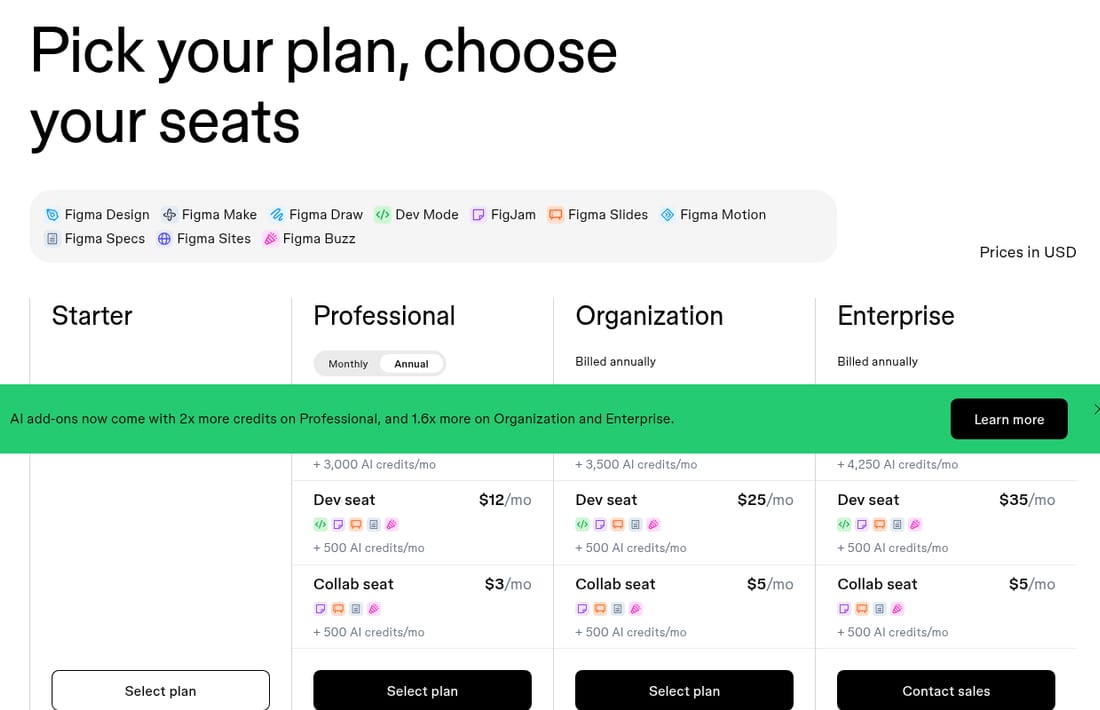
Pick your plan, choose your seats
The template, blank and filled in
Copy the blank template with the button, or read it row by row: each field has its blank prompt and, beside it or under it on a phone, the same field filled in on the Figma sample. The four role fields are the four findings of that sample as its page prints them, each under the analyst it is credited to. The PM, Marketing and UX findings carry a receipt with the words they quote and where they sit, and the Designer finding carries none. The question, the open questions and the handoff are ours, written as an example of what to put there.
Product teardown template
- Product and date
- What to writeThe product, its address and the day you read its pages.
- Figma · Captured
Figma · figma.com · Captured
- Question
- What to writeThe one question this reading answers, the pages it covers, and where it stops.
- Figma · Captured
How does Figma’s pricing page ask a buyer to choose a plan? The reading covers the pricing page and stops there: no account and no checkout.
- PM
- What to writeWhat the product line and the plans commit a buyer to: one observation, where it is on the page, and the words it quotes.
- Figma · Captured
PM · High impact
Ten product icons sit under one brand
Under the headline, a grey panel lists ten products, each with its own icon: Figma Design, Figma Make, Figma Draw, Dev Mode, FigJam, Figma Slides, Figma Motion, Figma Specs, Figma Sites and Figma Buzz.
Evidence:
Figma Specs
· Seen on www.figma.com/pricing/, pricing page hero, product list under the headline, second row · Captured · Indirect evidence - Marketing
- What to writeHow the product and its price are framed for a buyer: one observation, where it is on the page, and the words it quotes.
- Figma · Captured
Marketing · High impact
The hero opens with plan and seat selection
The headline reads 'Pick your plan, choose your seats'. The plan grid follows the product list below it, and each paid plan lists a 'Dev seat' and a 'Collab seat' with a monthly price.
Evidence:
Pick your plan, choose your seats
· Seen on www.figma.com/pricing/, pricing page hero headline · Captured · Direct evidence - UX
- What to writeHow a buyer compares the options and finds an answer: one observation, where it is on the page, and the words it quotes.
- Figma · Captured
UX · Medium impact
The comparison grid carries four tiers
Under 'Compare all features', the grid sets Starter, Professional, Organization and Enterprise as four columns. The 'Figma Design' section is open with nineteen rows, and fourteen more sections, from 'Figma Make' to 'Security', are collapsed.
Evidence:
Compare all features
· Seen on www.figma.com/pricing/, pricing page, heading of the comparison grid below the add-ons · Captured · Page context - Designer
- What to writeWhat the page puts first, and what competes for the first glance: one observation, where it is on the page, and the words it quotes.
- Figma · Captured
Designer · High impact
The plan grid starts directly under the hero
The plan grid starts directly under the hero, with Starter, Professional, Organization and Enterprise named in one row. The add-ons, the 'Compare all features' grid and the FAQ all come after it.
No evidence attached
- Open questions
- What to writeWhat the pages did not answer, written as questions for the next reading.
- Figma · Captured
What does a buyer see after picking a plan and seats, before paying? The capture stops at the public pricing page, so the next reading needs the checkout.
- Handoff
- What to writeWho reads it next, the day to check it again, and the link to the source.
- Figma · Captured
For the next pricing review: check figma.com/pricing again before quoting it, and attach the link to the Figma sample.
Fill in the template with coExploro
coExploro fills in the product, the date and the four role fields with its analysts’ findings; the place on the page and the exact words are yours to copy in, from the screenshot when one is attached or from the live page. Give it a product’s homepage address: in 2–4 minutes it captures that page with its date, then the site’s pricing and features pages when it finds them, and four AI analysts, PM, Marketing, UX and Designer, write findings from that capture, the same four roles as the template. The question, the open questions and the handoff stay yours, because only you know what the reading is for. You can try one run a day per network without an account, a free account includes 3 teardowns a month, and paid plans start at $16 a month billed yearly. It captures public pages, so it fills no field from behind a login.
The template by hand and in coExploro
By hand
- Product and date
- You open and save each page, and write the date
- Question
- You write it
- Four role fields
- You read the pages four times, once per role
- Quotes and places
- You copy the words and note where they sit
- Open questions and handoff
- You write them
- Time
- As much as the reading takes
coExploro
- Product and date
- Captures the homepage, then the pricing and features pages it finds, with the date
- Question
- Left to you
- Four role fields
- Four AI analysts write findings, each under its role
- Quotes and places
- A finding can open the screenshot it was read from, when one is attached
- Open questions and handoff
- Left to you
- Time
- 2–4 minutes
| By hand | coExploro | |
|---|---|---|
| Product and date | You open and save each page, and write the date | Captures the homepage, then the pricing and features pages it finds, with the date |
| Question | You write it | Left to you |
| Four role fields | You read the pages four times, once per role | Four AI analysts write findings, each under its role |
| Quotes and places | You copy the words and note where they sit | A finding can open the screenshot it was read from, when one is attached |
| Open questions and handoff | You write them | Left to you |
| Time | As much as the reading takes | 2–4 minutes |
coExploro captures public pages; the fields it leaves to you stay with you.
What each field is for
Each field keeps one thing the reading needs, so that another person can check it. The product and the date set what the reading covers: a page read on another day is another source. The question names the pages it needs and keeps the reading short; a teardown without one turns into a list of everything on the page. The four role fields read the same pages four times: the PM for what the plans and the product line commit a buyer to, Marketing for how the product and its price are framed, UX for how a buyer compares the options, and the Designer for what the page puts first. Each takes one observation, the place on the page and the words it quotes, never a verdict on its own. The open questions keep what the pages did not answer apart from what they did, and the handoff says who reads it next and when to check it again. A product teardown framework sets out the four steps behind these fields.
Reading the filled template
Read the filled column from the question down. The question asks how Figma’s pricing page asks a buyer to choose, and the Marketing field answers it most directly: the hero line asks a buyer to pick a plan and choose seats, so a buyer meets a choice before a price. The UX field adds that the comparison grid runs four tiers, and the Designer field that the plan grid starts directly under the hero. The PM field reads the product line rather than the plans: ten product icons sit under one brand, and which of them a plan includes is the next thing to read on the page. None of those is a recommendation. A reading such as that Figma wants a buyer to think in seats first may be right, but it belongs under the template, marked as yours, with the fields it rests on. Later on 29 October 2026, after the capture, the live pricing page opened with the same hero line, as the observation below shows. The Figma sample shows the whole teardown the fields come from, and coExploro’s methodology states what a capture can and cannot show.
Observed by us
Figma’s pricing page opened with the headline ‘Pick your plan, choose your seats’.
Fill it in for a second product
A template earns its keep the second time, when the same fields hold a second product and a row can be read across. Copy the blank template again for a product in the same category, keep the same question, and fill each field the same way, with its own date. The Canva sample, captured the same day as Figma’s, is one place to start: its Marketing analyst found the line ‘6+ MILLION TEAMS USE CANVA’ under the feature comparison of the pricing page, below the plan cards with their prices, an observation about where the page put its count of teams that day. When the two filled templates sit side by side, the differences in each row are the reading; SaaS competitor analysis sets two products against each other on four such questions.
Limits
What this template does not cover
- The template keeps to what a product’s public pages show, and it has no field for revenue, churn or a roadmap.
- A field filled in from one capture describes the pages on that day; another visitor, country or date can see other pages.
- Screens behind a login and what follows a click stay outside a still capture of public pages.
- A role field filled in by an AI analyst is a reading of one capture, so check it against the live page before it goes into a plan.
See it on a real product
The hero opens with plan and seat selection · Figma
Evidence:
Pick your plan, choose your seats
· Seen on www.figma.com/pricing/, pricing page hero headline · Captured · Direct evidenceThe '6+ million teams' line sits below the feature comparison · Canva
Evidence:
6+ MILLION TEAMS USE CANVA
· Seen on www.canva.com/pricing/, pricing page, line under the Compare features button · Captured · Direct evidence
Figma
Product design tools
Overall score 69 · Captured
Figma's pricing hero reads 'Pick your plan, choose your seats' above ten product names, and the comparison grid runs four tiers.
Canva
Design and publishing
Overall score 70 · Captured
Canva's pricing cards show Pro at US$144 a year for one person and Business at US$250 a year per person, and the pricing FAQ lists 19 questions.
Questions
What goes in a product teardown template?
The question the reading answers, the product and the pages you read with their date, one observation for each of four roles, PM, Marketing, UX and Designer, with the place on the page and the words it quotes, then the questions the pages leave open and who reads it next. Each line keeps its date and source, so a reader can check it without asking you.
Is a product teardown template the same as a product analysis template?
They cover the same ground when the subject is a product’s public pages. A product analysis template can also ask for market size or revenue, figures that come from sources other than a product’s public pages; this one keeps to what the pages show, with the date you read them.
How is this template different from the product teardown framework?
The framework is the process: set the scope, keep the evidence with its date, check each observation against its source and hand off the open questions. The template is the page you fill in while you follow it, one field for each thing the framework asks you to keep.
Can coExploro fill in the template?
It fills in the product, the date and the four role fields: paste a product’s homepage address, and four AI analysts, PM, Marketing, UX and Designer, write findings from a dated capture of that page, then of the pricing and features pages when it finds them. The place on the page and the exact words are yours to copy in, from the screenshot when one is attached or from the live page, and the question, the open questions and the handoff stay yours to write.
Run your own
Start with one product.
See how a competitor's homepage and pricing page are built to convert. Paste its address: coExploro captures its public pages, such as the homepage and pricing page, and four AI analysts read them for calls to action, pricing and trust signals. It takes 2–4 minutes.